The advantages of CLI's are (IMO) that they compose well and can be used in scripts. With TUI's, it seems that you just get a very low fidelity version of a browser UI?
[PWAs: Offline and background operation](https://developer.mozilla.org/en-US/docs/Web/Progressive_web...)
> that can be run remotely via SSH
Fair
> which doesn’t ship you megabytes of JavaScript
Not required at all; that would be a decision the app makes and not inherent to the medium
> works equally well on everyone’s machine
Provided they're using a compatible terminal with a compatible color scheme that doesn't just make everything unreadable.
> that would be a decision the app makes
OK but as soon as some moron with a Product Manager title gets their grubby little fingers on it the app does start shipping megabytes of JS in practice. TUI's can't, that's the advantage.
> which works equally well on everyone’s machine
Why are you so sure it runs equally well on everyone's machine? Even big popular TUIs like Claude Code do not really accomplish this.
TUI also means that I do not have to memorize an infinite amount of command line parameters.
I really like well-made TUIs.
- TUIs tend to be faster & easier to use for cli users than GUI apps: you get the discoverability of GUI without the bloated extras you don't need, the mouse-heavy interaction patterns & the latency.
- keybindings are consistent & predictable across apps: once you know one you're comfortable everywhere. GUI apps are highly inconsistent here if they even have keybindings
- the more limited widget options brings more consistency - GUI widgets can be all sorts of unpredictable exotic
- anecdotally they just seem higher quality
I've almost always got my terminal app open anyway, in the case of VS Code, I don't even need to switch to another app to use it.
For some reason, expressive keyboard-driven interfaces aren't as popular in GUI interfaces.
The popularity of TUIs is a result of the poor usability of current GUIs.
Use k9s for example. Let's say you want to determine where the value of an environment variable is coming from.
1. 'kubectl get deploy -n example' (find the name of the deployment in question)
2. 'kubectl describe deploy example-app -n example' (determine where the value for the env var is coming from)
3. 'kubectl get cm example-app-config -n example -o yaml' (check the value of the referenced key in the config map)
This is a very basic example but you can see where it lead to slow debugging that is made even slower by its propensity to typos and the need to look up command syntax. Once you get comfy in a well designed TUI, you can fly through this process in 10 seconds.
Though speed impacts are also something which I am uncertain about. Comparing Vim with IDEs, for sure there will be few things which are faster in vim but decent no of things which can be done faster in an IDE as well, so can't comment on your overall speed gains.
I also worked with a mythical 10x developer and he knew all the Visual Studio keyboard shortcuts. It was just like watching that payroll clerk (well, almost, we had under-specced machines and Visual Studio got very slow and bloated post v2008), I don't think I ever saw him touch the mouse.
Http servers are not installed by default, and they are a pita to configure / secure.
UIs used to be more responsive on slower hardware, if they took longer then the human reaction time, it was considered unacceptable.
Somewhere along the line we gave up and instead spend our time making skeleton loading animations as enticing as possible to try and stop the user from leaving rather then speeding things up.
Further, when building ssh "apps" you can build out tooling for client clis that already exist (e.g. rsync, sftp, scp, sshfs). This provides ergonomics because now users aren't required to install extra tools to deploy static sites, for example.
The entire experience is pretty seamless since all developers use SSH anyway.
However running web apps over forwarding is pretty decent. VS Code and pgAdmin have desktop like performance running in the browser SSH port forwarded from a remote server.
That's the point. For me, with very few exceptions, modern web UI is steaming pile of dogshit - no consideration for user's attention, speed, or usability. TUI are extremely low fidelity; there's nowhere to hide all that enshitified cruft! Stripping the functionality down to its bare essence vs navigating a bespoke web UI with the design aesthetic of clown vomit. I can tell you which one is more productive for me.
I see one of the other comments mentions K9s. The exact same use cases manifest with that tool. YES, if it's just a one-shot, nothing beats the CLI. Many things where you need to investigate the resources a bit more, lend themselves to a TUI (or GUI if that's your thing).
I come from an era where folks could fly through tasks on dumb terminals. (AS/400 apps). The moment we gave them "better" gui tools, they slowed way down. No matter how many times we told them, "you can still use your TAB and ENTER keys!" TUIs were just a sweet spot.
More broadly, I have concerns about introducing a middleware layer over AWS infrastructure. A misinterpreted command or bug could lead to serious consequences. The risk feels different from something like k9s, since AWS resources frequently include stateful databases, production workloads, and infrastructure that's far more difficult to restore.
I appreciate the effort that went into this project and can see the appeal of a better CLI experience. But personally, I'd be hesitant to use this even for read-only operations. The direct AWS cli/console at least eliminates a potential failure point.
Curious if others have thoughts on the risk/benefit tradeoff here.
It's also deprecated by Hashicorp now.
CDK on AWS itself uses CFN, which is a dog's breakfast and has no visibility on what's happening under the covers.
Just write HCL (or JSON, JSONNET etc) in the first place.
The “middleware layer” concern doesn’t hold up. This is just a better interface for exploring AWS resources, same as k9s is for Kubernetes. If you trust k9s (which clearly works, given how widely it’s used), the same logic applies here.
If you’re enforcing infrastructure changes through IaC, having a visual way to explore your AWS resources makes sense. The AWS console is clunky for this.
The tool misrepresents what is in AWS, and you make a decision based on the bad info.
FWIW I agree with you it doesn’t seem that bad, but this is what came to mind when I read GPs comment
Nobody is taking away the cli tool and you don't have to use this. There's no "turns into" here.
Unfortunately, I was unable to test in my light-background terminal, since the application crashes on startup.
So it does not support any meaningful multi-account login (SSO, org role assumption, etc), and requires AWS_ACCESS_KEY_ID/AWS_SECRET_ACCESS_KEY. That's a no-no from security POV for anything in production, so not sure what's the meaningful way to use that.
Fixed positions, shortcuts, tab-indexed, the order is usually smartly layed out. Zero latency. Very possible to learn how forms are organized and enter data with muscle memory. No stealing focus when you don't expect it.
Optimized for power users, which is something of a lost art nowadays. GUIs were good for discoverability for a while but increasingly I think they are neither great for power users nor for novices, just annoying and yanky.
With a 3270 if the mainframe takes a second to give you the next form, that's not a UX problem at all. If your character terminal takes a second per keypress, that's very painful and l a g g y.
But character terminals were much cheaper, worse is better, so it won out.
ssh admin.hotaisle.app
Can you tell me more about what do you mean by Neocloud and where are you exactly hosting the servers (do you colocate or do you resell dedicated servers or do you use the major cloud providers)
this is my first time hearing the term neocloud, seems like its focused on AI but I am gonna be honest that is a con in my book and not a pro (I like hetzner and compute oriented compute cloud providers)
Share to me more about neoclouds please and tell me more about it and if perhaps it could be expanded beyond the AI use case which is what I am seeing when I searched the term neocloud
We buy, deploy and manage our own hardware. On top of that, we've built our own automation for provisioning. For example, K8S assumes that an OS is installed, we're operating at a layer below that which enables to machine to boot and be configured on-demand. This also includes DCIM and networking automation.
We colocate in a datacenter (Switch).
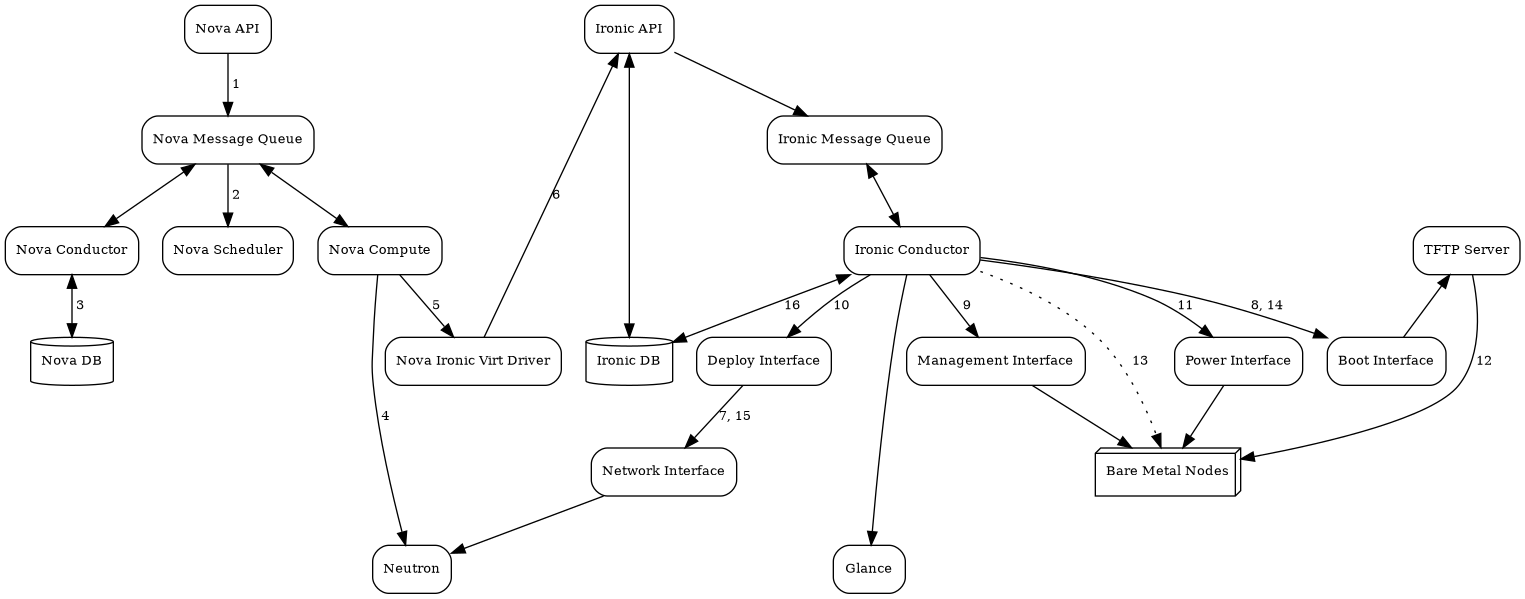
Ironic is an open source project in this space if people are curious what this looks like.
While it is a lot of moving parts coordination, I'm not sure I agree with the complexity...
https://docs.openstack.org/ironic/latest/_images/graphviz-21...
A service you have no use for or interest in is “a con in your book”, what?
Is it the best out there? No. But it does work, and it provides me with updates for my tools.
Random curl scripts don't auto-update.
Me downloading executables and dropping them in /bin, /sbin, /usr/bin or wherever I'm supposed to drop them [0] also isn't secure.
[0] https://news.ycombinator.com/item?id=46487921
Also, I find it is usually better to follow up with something like:
'It's better to use Y instead of X BECAUSE of reasons O, P, Q, R & S' vs making a blanket statement like 'Don't use X, use this other insecure solution instead', as that way I get to learn something too.
So one doesn't really need homebrew that has Linux as third class citizen (with the 2nd class empty)
Use Macports, it's tidy, installs into /opt/macports, works with Apple's frameworks and language configuration (for python, java etc), builds from upstream sources + patches, has variants to add/remove features, supports "port select" to have multiple versions installed in parallel.
Just a better solution all around.
Please people, inspect the source to your tools, or don't use them on production accounts.
This is not realistic. Approximately nobody installing AWS cli has reviewed its code.
> It's better to simply point at the binaries directly.
Binaries aren't at all signed and can be malicious and do dangerous things.
Especially if it's using curl | bash to install binaries.
It's also widely accepted as one of the tools of choice for package persistence on immutable distros (distrobox/toolbox is also another approach):
https://docs.projectbluefin.io/bluefin-dx/
Also, for example I use it for package management for KASM workspaces:
https://gist.github.com/jgbrwn/28645fcf4ac5a4176f715a6f9b170...
> as long as I have a basic Linux environment, Homebrew, and Steam
https://xeiaso.net/blog/2025/yotld/ (An year of the Linux Desktop)
I guess some post-macOS users might bring it with them when moving. If it works :shrug:
But on average brew is much more safer than downloading a binary from the ether where we don't know what it does.
I see more tools use the curl | bash install pattern as well, which is completely insecure and very vulnerable to machines.
Looks like the best way to install these tools is to build it yourself, i.e. make install, etc.
And you're fully auditing the source code before you run make, right? I don't know anyone who does, but you're handing over just as much control as with curl|bash from the developer's site, or brew install, you're just adding more steps...
I mean you can?
But that is the whole point when the source is available, it is easier to audit, rather than binaries.
Even with brew, the brew maintainers have already audited the code, and it the source to install and even install using --HEAD is hosted on brew's CDN.
https://docs.bazzite.gg/Installing_and_Managing_Software/
Linux is just a kernel, not everyone agrees on what is “better” and “cleaner” to use with it!
On my platform, Homebrew is a preferred method for installing CLI tools. I also personally happen to like it better on Linux than Mac (it seems faster/better).
When a person intentionally does it and spends a month or two - they far more likely will support it as they created this project with some intention in the first place.
With llms this is not the case
How long are you entitled to such support?
What does “support” mean to you, exactly?
If the tool works for you already, why do you need support for it?
What you're learning here is that there's not really a viable market for simple, easily replicable tools. People simply won't pay for them when they can spin up a Claude session, build one in a few hours (often unattended!), and post it to GitHub.
Real profit lies in real value. In tooling, value lies in time or money saved, plus some sort of moat that others cannot easily cross. Lick your wounds and keep innovating!
It is indeed not open sourced, as the repo only has a README and a download script. The "open source" they are referring to I think is the similar README convention.
Which makes this comment they made on Reddit especially odd: https://www.reddit.com/r/aws/comments/1q3ik9z/comment/nxpq7t...
> And the folder structure is almost an exact mirror of mine
Even though Rust has patterns on how to organize source code, similar folder structure is unlikely, particularly since the original code is not public so it would have to be one hell of a coincidence. (the funniest potential explanation for this would be that both people used the same LLMs to code the TUI app)
What _would_ you trust as a source of truth for source code if not a public commit log? I agree that a squash commit’s timestamp in particular ought not be taken as authoritative for all of the changes in the commit, but commit history in general feels like the highest quality data most projects will ever have.
You could probably get 90% of the way there with a prompt that literally just says:
> Create a TUI application for exploring deployed AWS resources. Write it in Rust using the most popular TUI library.
I’ve been a long-term k9s user, and the motivation was simply: “I wish I had something like k9s, but for AWS.” That’s a common and reasonable source of inspiration.
A terminal UI for AWS is a broad, well-explored idea. Similar concepts don’t imply copied code. In this case, even the UIs are clearly different—the interaction model and layout are not the same.
The implementation, architecture, and UX decisions are my own, and the full commit history is public for anyone who wants to review how it evolved.
If there’s a specific piece of code you believe was copied, I’m happy to look at it. Otherwise, it’s worth checking what someone actually built before making accusations based on surface-level assumptions.
Creating a tool via a LLM based on a similar idea isn’t quite stealing.
Hardly the same.