That's why it was rated low. Most people were using this interface on PC's and laptops, without a touchscreen, where a touch-focused interface does not make sense. Maybe it was good choice for Windows Phone or Windows Tablet, but people were not rating it based on that experience. The very idea of using a single UI for both a touchscreen-oriented and no-touchscreen, kbd-and-mouse computers is the most problematic aspect of it.
> It was simple
No, it wasn't simple. There was the simple part, but things not integrated into the simple part were a hodge-podge of previous Windows versions' UI. Now, I like some of the previous Windows versions' UI, but putting a simple veneer on something does not make it simple; if anything, a little more complex.
> It was fast
The fact that an OS UI in the 2010s or 2020s need to be commended for being fast is kind of sad. Plus - I don't believe it was that fast. Did you try running it on, say, a 15yro machine relative to the Win8 launch time? i.e. 1998? Even with a 10yro machine I believe it was kind of sluggish.
Pre-announcing that they were leaving all Winphone 7 customers behind for Winphone 8 meant that every retailer/distributor was left with unsellable stock (because they hadn't gained enough traction to sell out initial shipments).
If this was because Nokia made bad/cheap phones that were un-upgradeable or MS being arrogant isn't something I'm remembering anymore but the end-result was pissed retailers and nobody selling WP8.
All that said, WP8 did a lot better than WM10, where the WP8 phones were promised to be upgradable, and then the promise was walked back for low mem phones, and the experience was poor for qualifying phones anyway.
The final build of WM10 was actually ok on my Lumia 640; but that was way after everything was canceled and mobile Edge (this was the first non Chrome Edge) was still less usable than mobile IE, even though the renderer was better.
The really poor rollout of wm10, plus the tradition of forcing developers to make split builds to support multiple versions of windows phone/mobile made things pretty bad at the end. Calling the build for WM10 only 'universal' was icing on the cake. Android has all sorts of problems, but you can have a single APK that works on lots of versions, with some amount of new features get pushed to old OS with libraries and some new features have to be detected at runtime and use alternate flows. On the other hand, Microsoft kept making new features require using new foundation libraries that were unavailable on old phones. WinCE -> WP7 -> WP8 -> WP8.1 -> WM10 was too many step changes and developers bailed at each one. Meanwhile on the desktop, a 32-bit win32s application targeting windows 3.1 has a good chance of running on windows 11.
Also, they managed to make upgrade from wp8 to wm10 break installed apps sometimes. That wasn't great.
#notbitter
But maybe Google would have updated their WinCE apps to WP7 if Microsoft didn't make them throw all their work away.
In the US, Windows Phone tried for the "iPhone experience", which made carriers unhappy and less likely to want to sell it, which ultimately left it the case in the US at a point where only one US carrier at a time was even "exclusively" selling the latest Windows Phone hardware, and only through its dedicated retailers. It took too long for Microsoft to also realize that part of the iPhone plan in the first place was direct to consumer sales and pressuring the phone carriers to provide SIMs rather than making "exclusive" hardware deals with carriers and hoping other carriers would try to compete for buying your hardware as well.
Carriers were especially unhappy that Microsoft bought Skype at the time and tried to run it as a loss-making business to undermine carrier voice and messaging revenues.
About phone OS upgrades, remember the HTC HD2 which originally released with WM6.5 but could be upgraded to WP7 and then to WP8 through after-market community ROMs. It was also Microsoft's decision to not officially allow that.
Look at all 5 of us reminiscing here...
I remember overhearing one of the sales folk having to explain to a woman that they can't sell her the white ones, only metal ones as she preferred the chunky plastic.
However the way Microsoft has messed it all up, no one is left besides Windows team and some hardcode believers, to care about WinRT/WinUI any longer than what is only available via WinAppSDK.
In the mobile space, there was no market for just Windows Phone apps. You needed to support native Android and iOS already. WP was just another burden without a clear return.
In their desperation they started paying college students for developing apps for the platform, leading to low quality experiences.
They pushed WP hard to their channel. Many employees in MS system integrators and managed services got very cheap phones, but outside that group, just nobody bought them before in the end they started dumping them to the masses as cheapest phone in the store, but there ain't no serious market there either.
I was one of them, initially getting a Lumia as second phone even though as ex-Nokia I was kind of pissed off, developing for UAP/UWP grew on me and was much more fun than dealing with Android.
Now given how Microsoft has messed up the whole UWP, Project Reunion and WinUI/WinAppSDK I would assert there is no faith left.
Here's the story:
I worked on the infrastructre for the predecessor to Android, the Danger Hiptop, AKA "The T-Mobile Sidekick." (This is my real name, you can see when I worked on it on LinkedIn.)
The "Danger Device" as everyone called it, had cloud storage and a full web browser before Android and before iPhone.
In fact, the first Android basically looks like the successor to the T-Mobile sidekick, because many of the people that worked on Android, including the founder, were from Danger.
*Here's the funny part:*
This is hearsay, so please do not sue me Microsoft. I once saw an article online that confirmed the following story, but the article is long gone (this was more than 20 years ago.)
Again: Don't sue me Microsoft. I am telling a story here, that I heard through the grapevine:
*Microsoft blew up the entire "Sidekick" project.*
But they didn't blow it up intentionally. Basically, Danger ran on Sun Solaris, and when Microsoft bought them, a great deal of the infrastructure was trucked over to Microsoft. As I understand it, nothing was ported, they basically just plugged the gear in.
At some point, the backups failed.
Keep in mind: ALL THE USERS DATA WAS IN THE CLOUD. Nobody was doing this at the time, not Android, not Apple. Just Danger - and then Microsoft.
While restoring from backups, someone was feeling the heat for the mobile devices being down for so long. It takes a long time to do a restore.
One thing led to another, a decision was made... and they lost all the data.
*poof*
Gone forever.
The death of the Sidekick has been documented in various articles, but there was only ONE that got the story correct, and it was nuked over a decade ago. Here's one of the (partially correct) details: https://abcnews.go.com/Business/sidekick-disaster-shows-data...
I've got a story about the first big celebrity hack too, that was the Sidekick also. (And likely was possible because of the Sidekick's cloud storage.)
https://availabilitydigest.com/public_articles/0411/sidekick...
Details are on page 3.
* The Sidekick servers were moved to Microsoft, and I believe they were moved from where I last saw them, which was at T-Mobile's data center in Washington.
* There weren't a heck of a lot of Solaris experts at Microsoft at that time.
* According to the PDF above, someone had posted a job ad for a database administrator for the project, two months before the database blew up.
So if we connect the dots (this is speculation Microsoft, don't sue me):
It seems possible that the database for the Sidekick service was the responsibility of someone at T-Mobile or Danger, until Microsoft acquired Danger. My hunch is that it was probably TMo, because the founder of Danger left to go start Android in 2003. By the time Microsoft bought Danger in 2008, a lot of the original Danger folks were working on Android.
It sure seems like the outage was most likely caused by an inexperienced DBA taking responsibility for a database that had been the responsibility of the same DBA (at Danger, or more likely, TMo) for over half a decade.
And that ONE database outage probably changed the entire course of mobile phone history. IMHO, Microsoft wouldn't have purchased Nokia in 2014 if Danger hadn't blown up in 2008. And Danger was way ahead of the iPhone and Android in 2005.
In some alternate universe, there is no Android, there is just Microsoft Sidekick and Apple iPhone.
Cursed marketing.
Besides the fact that we didn't have any real money to promote phones at T-Mobile (and I think we were the only US carrier with the hiptop) -
Would you believe that the first hiptop came out the same week as 9/11?!
So it was this phone that was arguably two-ish years ahead of the iPhone, but nobody seemed to know it existed, until it got some traction via sheer word of mouth. Everyone who used the HipTop basically wouldn't go back to anything else at all. The HipTop had that 'addictive' quality that the iPhone had. It was nothing like the Blackberry, where people largely used it for a single killer app.
I first read a review of it in a Mar 2003 magazine.
The smartphone stuff, a lot of that development was running in emulators, which likely reduced the time-to-market.
I distinctly remember seeing devs working on future phones in emulators, but most of the devices we sold were just upgrades to existing devices.
That was probably the moment when Nokia and Ericsson and RIM should have been paying attention to what was happening just south of Microsoft in Bellevue. But none of those three companies had a significant presence in the area at the time, AFAIK. The Silicon Valley folks were flying in every single day. I'd argue that this is what killed Sprint too; they were five hours from anyone. The predecessor of AT&T Wireless was so close to T-Mobile, you could drive from one HQ to the other in under fifteen minutes and you could stop off at Microsoft on the way over.
Definitely an example of the synergies that are possible when you have a couple of tech titans who are less than 90 minutes away from each other via Southwest Airlines.
« Oracle and Sun fingered for Sidekick fiasco
https://www.theregister.com/2009/10/19/sidekick_rac/
Just think what they'll do to Microsoft when they merge »
I kept my job.
It turned out that the reason that Paris Hilton and so many celebrities got hacked was:
* the password to her cloud storage account was the name of her dog
* once the hackers had access to her cloud storage, they could use that to get authentic phone numbers for half of the entertainment industry, because Paris Hilton was so well-connected socially.
AFAIK, nobody ever managed to get access to the servers illegitimately. The demise of the service was a failed back up of the Hitachi SAN.
Honestly, unless it was said clearly in jest as their ass was in the same boat, that is such an extremely incompetent management communication.
Charms are somewhat similar, too. On iPhone almost every app needs a Share button somewhere and almost every app still has it in a different place today. On Windows Phone 8 it was much more obvious why a dedicated OS-level Share button accessible just about anywhere in any app was pretty great. On Desktop it wasn't seen as helpful as almost no apps supported it (either as shareable things or as apps that could be shared to) because there was no easy Win32 bridge and Microsoft also didn't think to try to integrate with clipboard operations until too late in Windows 8.1 (and then never quite delivered it because most everyone had already written off the Charms by then), as what could have been a potentially easy path to use the existing Windows "share paradigm" to bootstrap.
(You can make cases for the other 4 Charms as well beyond the Share charm, but the Share charm is the most obvious where Windows Phone proved it was a good idea but the Desktop didn't have enough supporting apps to also prove it there.)
"...and after people acclimate to them, we'll put ads there! Advertising Directly in the UI!"
WP8 was a far "better" OS, but it came with higher system requirements more comparable with Android.
Google never got enough crap on for their stunts with youtube in that era though.
WP7 was sold to me in more like that language of "this is a quick MVP on the way to the next phone". It was exciting at that time in that way, seeing it as the hail mary pass of "What if we replaced WinCE with all the things we learned from the Zune? How quickly can we do a version of that which will give the right impression and set us up for the next 'real' version?"
Unfortunately yes, it wasn't sold to everyone with that perspective. I think Microsoft may have counted on developer enthusiasm a bit more to get the word across.
Also to be fair, that was still the era where "everyone" bought the new iPhone at launch and iOS compatibility was seen as somewhat equally spotty that if you didn't have the latest hardware you didn't expect the next iOS version to run well and you'd expect to get left behind on apps. It was also the era where Android was often non-upgradeable between versions on hardware (because carriers wouldn't "certify it") and you generally assumed an Android device was version locked to whatever OS version you bought it with. Microsoft may have felt somewhat safe needing a hardware jump between WP7 and WP8 exactly because that was de facto the case with iPhone and directly the case with Android at the time.
To be fair, Android UI framework in that era was also bad. But it appeared several years before Win Phone 7, so developers had to get good with it.
I had an extensive Silverlight and WPF background by that time, so I still don't quite know why so many developers seemed to have a problem with it. I also did a lot of "convert this screen from WPF to Silverlight" and "now convert it back to WPF" that at the time I also didn't see why so many people were complaining about updating XAML from WP7's Silverlight XAML to WP8's UWP XAML. XAML is XAML. XAML is just stupid, ugly XML. Most of the work is updating XML namespaces, which can be automated with XML tools. Assuming you've used a pattern like data-binding or "MVVM" you shouldn't have much business logic to change between XAML versions, was my opinion at the time. As an Enterprise developer having done a ton of that as company winds shifted and more apps needed to be Silverlight one month and others WPF, depending on shifting winds/moon phases and "we want to just HTTP deploy only now" and "how easy can you embed this in VB6 without going crazy".
Money on app stores is made by games. In addition to being rewritten in C# games in Silverlight had to wrap Silverlight primitives - there was no DirectX or GL ES equivalent API. There were even quite wacky workarounds for this on built in components (like render tiles to textures from some linked in C++, which are then used by Silverlight) but weren't great for anyone.
The result of this was WP7 was an island, and one which had no commercial proof of worth until it was too late. We would all be better off had WP been and stayed viable.
It was a massive lost opportunity in UWP that DirectX never released proper, first-party WinRT components. It's still almost criminally weird that DirectX still prefers ancient COM to WinRT. I partly understand it from a backwards compatibility perspective of support old games for the longest amount of time to not just move DirectX entirely to WinRT components, but WinRT was built for forward compatibility from COM and there are and have been Windows APIs with both COM and WinRT projections.
Some of it just seems stubbornness that DirectX isn't directly usable from WinRT (and/or that "second party" projects like XNA were murdered). Certainly another thing to add to the list of why Windows Phone 7/8/10 all failed to have half the catalog of games that other systems had. (There was some DirectX in 8 and 10, but only for C++ apps. It should have played way more ball with WPF and in languages like C#.)
[0] Far more than it shares with Win32, which is partly why some die hard Win32 programmers have always disliked XAML.
But the framework itself doesn't seem much different to today. I remember using the HTC Desire and HTC Dream and being impressed, then the Motorola Atrix 4G with lapdock (!), a device ahead of its time and with insufficient RAM or CPU performance but the a great idea running a nice Linux desktop environment.
I suddenly realise how long ago this was and how old I feel.
Touch-optimized UI on desktops: One step away from where it belongs.
Touch-optimized UI on servers: Very very out of touch.
Firing sinofsky for it: Good.
Windows phone was great. I think I got it when Android was still growing up. I liked the focus and the speed for sure.
Microsoft's bread and butter is no longer OSes, I think, and it's unfortunately starting to show.
I had an original Lenovo yoga and boy the desktop touch experience was bad. Hardware wise it wasn't winning any prizes either. The cooler died a couple of times and replacements were a pain to procure.
Obligatory car analogy: a mechanic working in his shop has a completely different set of tools available than if he was going into the field to fix a car.
I agree with the comment from @zak on this.
I have to disagree.
I have used GNOME (both GNOME Mobile and Phosh) on phones, and it makes more sense there, but it's still a bit clunky and fiddly.
Example: you only get half the tiny screen for your app launcher. So it fills up fast. So, you put apps in groups. BUT you can't pin groups to the fast-launch bar thing.
On the desktop, IMHO it does not work well. It works minimally, in a way that's only acceptable if you don't know your way around a more full-featured desktop. It feels like trying to use a computer with one hand tied behind my back. Yes, it's there, it's usable, but it breaks lots of assumptions and is missing commonplace core features.
Simple features: desktop icons are handy.
GNOME: ew, how ugly and untidy! We're taking them off you.
Obvious but complex features: menu bars go back to the 1970s and by the mid-1980s were standardised, with standard shortcut keys, with standardised entries in standardised places. They work well with a mouse, they work well with a keyboard, they work well with screenreaders for people with vision disabilities.
GNOME: Yeah, screw all those guys. Rips them out.
Non-obvious but core features: for over 30 years in Linux GUIs, you could middle-click on a title bar to send it to the back of the window stack.
GNOME: screw those guys. Eliminates title bars.
No, GNOME does not work _well_ on both. It is sort of minimally usable.
On both, it's minimally functional if you are not fussy, don't want to customise, don't have ingrained habits, and don't use keyboards and keyboard shortcuts much.
I also think it breaking traditions is a good thing. It feels weird at first but without someone trying something new we won't see any progress. I do think they're a bit fast to do away with things they see as outdated but GNOME has a very particular design anyway that lets you get shit done when you learn it
There was existing UI for this. It's called IBM CUA and it's been around for about 40 years now.
https://en.wikipedia.org/wiki/IBM_Common_User_Access
It worked in Windows 2 and 3 and everything since. It worked in DOS since about 1990. It worked in OS/2. It works in Xfce, and up to a point in LXDE, LXQt, GNOME 1/2, MATE, Cinnamon, EDE, XPde, and lots of other Linux and xBSD GUIs. A form of it works on MacOS.
But GNOME ripped the whole UI out and has re-invented a worse version of its own. (KDE has partially kept something like it but changed half the keystrokes, which is almost worse.)
If you're blind or have some disability that stops you using a mouse, say, this makes it a TONNE more work.
That was a bad idea.
I want the industry standard UI back.
It created this massive doorway effect where I'd hit Start and the whole screen would whiz and spin and then there'd be all these moving tiles and I'll forget what I hit Start for. Frequently I'd then hit Esc, remember, and Start again. This was compounded by the fact that if you started typing after hitting start it wouldn't just filter to the applications. God knows what it would actually do but not that.
I was one of the people who enjoyed Windows Vista (which introduced sudo to Windows users) and Windows 7 and even Windows 10 after which the i7-4790k machine I had to do the Windows was no longer eligible for Windows 11 so I have no idea what that looks like.
0: https://en.wikipedia.org/wiki/Event_perception#Relation_to_e...
The obnoxious Windows start menu was on Windows Server for a while, and it was unbearable. Sadly the Start menu in Windows 11 is just as useless, and I miss the performance of the Windows 98 / NT / 2000 / XP (in simple mode) menu where you could press Start > P > A > N (or Start > P > across right > N) and know it would go Start > Programs > Accessories > Notepad in 4 keypresses in lightning time.
We have never returned to this speed or efficiency.
I didn't mean to lump Linuxland into one "we" but I was referring to the general flow of the landscape (particularly in GNOME land) where there was the enthusiasm to simplify (aka "remove features") and do odd UI things to remove the previous 35+ years of desktop interaction for no obvious reason.
Apologies for my generalisation.
I’m not saying I liked GNOME 3, or agreed with their decision to make life more difficult for mouse navigation and longtime power users, but it was easier to navigate with a finger. That was the obvious reason why they did it.
The search in Win 11 is better. For ex: I need to change display timeout setting. I vastly remember it's in "power option" menu, and power option is in control panel. But i cant remember exactly how to reach "power option" from "control panel". In windows 11, i can just type "power option" and it would direct me to the power option screen, meanwhile in XP, i had to explore around before reaching it.
I think "Search" in Start menu is kind of heading in right direction(imo they should remove the search-on-internet), just need to improve performance.
What changed is that by Windows 7 launch, PC specs had caught up with system requirements and WDDM drivers had matured and were no longer crashing all the time. So the first impression was very different.
I hated that UI so much, I'm glad I barely had to use it (that it was slow was due to underperforming hardware, esp. laptops, for which it arguably wasn't meant to run on).
In the meantime, I'll migrate away from anything Apple, for two reasons: 1) I don't want to be dependent on a US company for my OSes, and 2) thank you very much Apple for this design choice making #1 a lot easier. But what I cannot say is 3) it is slow and buggy. I mean, the design itself is bad if you ask me, but the OSes aren't slow. The hardware can deal with it.
This implementation gets one thing most Metro clones miss, i.e the typography as structure paradigm. In Win8, there were no divider lines or heavy drop shadows to denote hierarchy. The hierarchy was defined strictly by the weight and size of the font.
We spent the last decade drifting back into glassmorphism and mica materials (win11) because people missed the comfort of texture but from a pure information density and rendering performance perspective - the flat, monochromatic 2D plane of windows 8 is a nice tangent. It removed the cognitive load of decoding the UI chrome for touch users.
ps: I'm impressed by the constraint of using native Qt/C++ here instead of taking the easy route with electron or QML/javascript bindings for everything.
While they were certainly flat, they were always clearly signaled from my memory - did other people have this issue?
To be clear, when it was released I was one of the people hating on it, but it grew on me over time - and after I installed startisback, which essentially just scaled down the start screen/Metro ui to a slightly larger start menu ... It was a decent UX again, to me.
There were other issues that I clearly remember. There was some remarkable jank when moving the mouse cursor across screen borders in a multi-monitor setup. If you were moving towards the edge of the current screen, Windows would under certain circumstances trap the cursor there instead of moving it across the border. I believe this was done to give "hot corners" a bigger mouse target, but that feature was almost completely DoA on desktop.
yet no linux WM has a decent windows8-10 window border clone.
KDE used to but since the rewrite of the theme from kde5+ they not only killed it, but also removed the option to have sane window border color to show focus. Now it's "accent color" which should be non contrast because they will force that same color on toolbars and such, just like all the bad ideas from office-ribbon era.
https://debugpointnews.com/wp-content/uploads/2023/04/OpenBS...
Anyhow it's bold to claim that there are no linux window managers to rival win8, linux is like the paleozoic of desktop interfaces. It has the opposite problem there are too many of the infernal things.
I am not exaggerating when I say they could be over 1000 themes for Fluxbox/Blackbox.
The default XFWM themes (coming from XFCE 4.10) include several ones with a even a clear grabbable border, if not all of them.
We had the Bluecurve theme from Red Hat when some HN users didn't even start Elementary school.
And with FVWM literally you could mimick any interface ever.
They were mostly variations of a theme, and the ones that were not had debatable aesthetics.
But yeah, Bluecurve could rock, especially when customized.
FVWM? Perl? Oh noez! Such complication! ;>
On XFWM I remember one with traffic light colours and square buttons which was perfectly usable. Also the theme pack came with an almost exact copy of the Windows XP's Luna theme.
> We had the Bluecurve theme from Red Hat when some HN users didn't even start Elementary school.
True. Bring back Bluecurve on KDE. Bring it back on both. Fedora peeps, job for you.
Regardless of whether or not this was done for fun or due to actually missing Windows 8(as the author does), it's impressive.
I remember reading some time ago that the windows 8 UI lead got fired but I can't find proof of that now. Maybe it was just satire lol
"Liquid glass" and all.
Aw, come on.
WinME had the exact same UI as Win2000, and for a lot of us, that was the peak of Windows' design.
Secondly, Win11 is worse than ME in every important way. ME was all right once it got a few fixes, and worked great on very low-end kit that NT wouldn't look at.
Apple did not even bother with touch screen laptops on the other hand.
My favorite goof of Windows 8 was the most googled question: "how do I turn it off?"
It required stupid mouse witchcraft and incantations to shut off if you weren't in a touch screen.
Windows 8 was Microsoft thinking everyone was going to use touch screens for EVERYTHING and ruining the non-touch screen experience for most.
I'm using it on CachyOS with on old intels(Kaby Lake Core i5-7500t/Core i7-7700t) with old intel integrated graphics(HD630), and it never did that. Since early Plasma6/late Plasma5 times. Cant recall exactly anymore, for about 2 years now. In fact, since Plasma6 it reminded me of the good old KDE3 days, again. Except for the memory usage maybe. OTOH the systems have much more memory since the times of KDE3, so shrug?
If everything else fails, there is still https://www.trinitydesktop.org btw.
It felt great to watch Gnome stumble after all the shit-talking, some schadenfreude was in order. I didn't care much for Windows 8; Vista was a the bigger mess of a release.
Plasma criticism was pointed and deliberate and grownup. Windows 8, less so.
The problem was that it was a bunch of people who had no good ideas and no insight trying to come up with new paradigms for interaction, and they were all bad. What the Linuxen desktops were doing was even worse than Win8, and the ones on that journey were all determined for some reason to deprecate the old WinXP clone UIs at the same time. Gnome really moved into a position of harassing and mocking its old users (basically regulation redhat behavior.)
Click on a pdf? The whole screen turns bright red for a second before loading. Click on a Word file, same but blue. It was hell to use for people sensitive to flashing lights.
I got special permission at work to stick with Windows 7 longer than the rest of the company for medical reasons.
The only redeeming thing I could say about Launchpad is that it did not replace Spotlight (unlike Windows 8 Start Menu which was a replacement to the previous start menu)
Launchpad appeared for the first time in Mac OS X 10.7 "Lion" in July 2011.
Windows 8.0 launched August 2012.
Personally I think both are inspired by the full-screen launchers of iOS and Android, and not by one another.
> Windows 8 was Microsoft thinking everyone was going to use touch screens for EVERYTHING and ruining the non-touch screen experience for most.
Did/Does anyone actually use the touch screen on a laptop? Surfaces still ship with a touchscreen, so I assume they've done their market research.... It just seems like the trackpad/keyboard are the better ways to interface with your laptop, especially when it's already built in and not BT accessories or something. I hate to sound like an Apple fanboy but I'd assume the thought process was something along the lines of "Customers want touch screens on phones and tablets, not laptops"
My laptop fills the role of "Desktop computer on the go" and I want it to emulate that as close as possible, aside from form factor. Maybe I'm in the minority there? Others do use a laptop as a primary 'daily driver' and want the touch screen?
Nooooo, please don't touch my screen! I can't stand fingerprints on my laptop display! Pretty much every gesture you mentioned has a touch pad equivalent that works just as well or better for a desktop OS.
I feel like trackpads do most of the above better than a touchscreen? Mac trackpads, at any rate (I do recall a lot of PC trackpads and/or drivers being hot garbage)
It really depends on what you do.
The part of the hardware I really don't like is that the `Fn` key toggles fn-lock with a tap and then alt + F4 and such don't work. There's enough space to have another row of keys or something, I never want fn-lock off (I use four finger scroll for volume controls), it's infuriating. But pretty much all laptops (and shockingly some desktop keyboards) have similarly dumb behavior.
Say you had a mechanic you brought your car to for an inspection and they would set it on fire in the parking lot because of "evil ghosts" since they heard a squeak that sounded like evil ghosts speaking. Calling what they did "good intentions just poorly executed" isn't really fitting is it?
Microsoft got hit by a case of delusion on a corporate level where seemingly good arguments combine to create the completely wrong conclusions.
- there was already an extremely heavy expectation that clicking the start button or pressing the windows key would bring up a menu, not a full screen takeover where all contextual sense of place (that you had in the past experience) was lost.
- the UI being a full-screen takeover on a phone (Windows Phone) or a tablet (10"-ish tops at the time) was OK but on a 21~27" desktop it's absurdly overwhelming.
It felt like wasted space on the desktop because it was originally hard for desktop apps to opt-in to Live Tiles and send Live Tile updates and not enough people were using the sorts of multi-platform apps that had great Live Tiles.
At least in my experience there was a lot of sense to it. I had a lot of data organized to my liking in Windows 8.
So it was a bit of a love/hate relationship.
Windows 2K is still the best ever made by Microsoft. I wish they'd just stay on that design and make incremental improvements to keep it fresh and modern.
Agreed and it happens with almost every sunsetted version of Windows. At the time of XP, it was how great W98SE was, and in 7, XP was so amazing, etc., etc. I think the "every other version" meme has only recently been killed by MS because it has been so long from 8.1 to 10 to 11. But even when 11 is sunsetted, there will surely be articles about how amazing 11 was and how much they dislike 12.
Windows 8.1 combined with StartIsBack was a much better OS than Windows 10 I was actually surprised when everyone praised that ad pushing piece of crap with mandatory spyware, forced updates and inconsistent UI all over the place.
It was last seen perhaps in the Windows 11 Beta 1 release, confined within the start menu and I think this is where it peaked. It was removed shortly after to the yuck we have now, perhaps slightly coming back in 25H2 with the New Windows 11 start menu experience app groups (I have not personally used it)
I think that Microsoft was ahead of its time and that they had a better design language than any competitor and original metro still holds up favorably to contemporary designs.
Last time I sat down with a windows 11 pc I even thought “wouldn’t it be better if the start menu was just full screen?”
At the time (1993, when NT came out) there was a good reason.
C-A-D was a special reserved keystroke that couldn't be intercepted or redirected. So you could use it even to interrupt a task that had frozen the entire UI.
Using it for login meant it could bypass and circumvent any malware that attempted to steal credentials, etc.
Then MS let people replace the GINA that handled it, and then they let people turn it off, and it joined the rest of the slide into junkware...
This is some of what I wrote in July 2013 as suggestions for how Windows 8 should change behavior when mouse and keyboard is present:
• By default, boot to the desktop. (This is a new individually available option in Windows 8.1.)
• By default, return to previous applications. Similar to Windows Phone and Windows 7, when you close an application, you should return to where you were before. If you are in any kind of desktop experience when launching an application, whether it's for the desktop or in the Modern interface, you should return to that desktop environment upon closing the application.
• By default, open media files and documents in desktop applications. Fortunately, when you select these as your defaults, you are properly returned to the desktop when you close the application. Unfortunately, any Modern applications return you to the Start Screen when you close them.
• By default, if there is no touch screen, disable hot corners and edges. Provide an option to enable them within your mouse-driven experience.
• By default, if there is no touch screen, provide a classic Start Menu in addition to the Start Screen. Mice are well-suited to smaller menus that pop out and allow you to remain largely in the desktop experience while you select new files and applications to open. Provide an option to disable the Start Menu and jump to the Start Screen if desired.
• Upon first run and selection of the mouse-driven experience, run a video demonstration introducing users to the Modern interface, Start Screen, hot corners, gestures, charms, Windows Store and Modern applications, focused on how to access these items with a mouse and keyboard.
• By default, provide a Search experience tailored to the desktop environment.
"Most of the above options already exist in Windows 8, but it takes some information, time and effort for users to change the settings and get the experience you expect when using a system without a touch screen, largely driven by mouse control. It is in these conditions that users are frustrated by Windows 8, as they find themselves faced with interfaces that are much friendlier to touch screens, and are unexpectedly removed from the desktop experience and placed into the Modern interface and Start Screen, disrupting their workflow and adding extra steps to return to the windows, applications and tasks they were working in. An overall one-click default upon first usage of Windows would allow users to select the mouse-driven experience they prefer on systems that are not primarily driven by touch."
Projects like this show that it has its fans. It feels like authors being successful only after their death. I still think of the Windows 8 UI as terrible overall, but now that the hate has passed, people are not afraid to give it some redeeming qualities.
It was pretty good on mobile though, which is the root of the problem I think. They tried to unify what shouldn't be unified.
Is that crochety nostalgia, or the innate peak of the interface design? Hard to say.
But I liked buttons that are distinct from the background, a judicious use of color, evoked depth and texture—especially for things that were supposed to pop "in" and "out" of the page, scrollbars I could always find, and things generally being keyboard-navigable in a pinch...
Party of one, for sure, LOL
Glad to see an attempt to revive it on Linux
Everything you need, nothing you don't. The OS/DE stayed in its lane.
Whole blog is about his time at Microsoft but this particular post mentions windows 8
I hope you take on that initiative and make the improvements that they didn't
I hope that somebody creates something like this for windows 7 as well. One can only hope as Windows 7 nostalgia hits hard
Sure one can try to patch our way and this is what people suggest but if we are already having windows 8, Please lets just have windows 7 as well, there is no harm in it.
I hope that the author of the project or its community about the win 8 DE could look at resurrecting/creating win 7 DE ootb as well.
Not to diss the UI attempt at all, I just always seem to spot all these little things/polish every time one of these come up (I've seen so many XP clones where the minimize/maximize/close buttons look out of place and badly shaped, etc..). I genuinely wonder if it's because I spent so much time on these OSes back in the day or if all the DEs being used have some inherent limitations that cause these design inconsistencies.
The beautiful thing about Free software is that people can do whatever they want! In a way is is quite impressive that somebody can get into the uncanny valley with this sort of project, right?
Many underestimate just how much is behind everyday basic UIs.
Even the biggest native Linux desktop projects suffer from this. KDE is typical death by a thousand papercuts, GNOME tried but their amateurism is clearly visible.
I don't think people realize just what an insane amount of labor it is to get these things implemented, even if you're handed a perfect design spec up front.
Maybe LLMs will close this gap once they get better at seeing things.
If my employer didn't use Windows, I probably never would have used it again. But yeah... why would I want the worst part of Windows 8 on any *nix system?
Now, if someone wants to recreate win95, I might be interested
You can try Chicago95 [1], but it's only a XFCE theme. If you want more than a theme, there's SerenityOS [2] but it isn't suitable for daily use (yet)
[1] https://github.com/grassmunk/Chicago95 [2] https://github.com/SerenityOS/serenity
Chicago95 isn't far off looks-wise. Something slightly more polished than Xfce, but way less than the behemoth that KDE is. I really feel like the modern basic desktop UI was pretty close to complete in 2002-2005, and the moment we tried to make your contacts list available for use in every single application we fell onto a slippery slope from which we have never recovered.
I which distro this is being tested on.
I certainly don't miss that desktop environment, though.
--"I made a game for a certain kind of person. To hurt them."
Qt has a C++ backend, so C++ is used. Qt is relatively safe and well designed.
https://doc.qt.io/qt-6/qtqml-javascript-expressions.html
Is your complaint with Electron, the "browser as local GUI app" framework that's been popular with SaaS vendors for their "native" apps?
Like, electron is fine, but it's orders of magnitude slower than it needs to be for the functionality it brings. Which is just not ideal for many desktop applications or, especially, the shell itself.
Ultimately people use electron because they know HTML, CSS, and JS/TS. And, I guess, companies think engineers are too stupid to learn anything else, even though thats not the case. There is a strong argument for electron. But not for Linux userland dev, where many developers already know Qt like the back of their hand.
[1] https://best.openssf.org/Compiler-Hardening-Guides/Compiler-...
What, like GNOME Shell you mean?
Sadly, this clone looks very‐very bad, just like millions of WP8‐like launchers compared to the actual WP8.
Not to crap on the dev, but ignoring it is also counter-productive: it feels a bit like seeing one of those iPhone 4 clones that ran on J2ME trying to parody iOS - impressive attempt at making a dumb phone look less like a dumb phone, but it was miserable to use or even look at. I see this all the time around Linux UIs, no one has standards and no one wants to point the lack of them out.
No one has time to follow the links and watch something there.
Then they'd call it Copilot OS in 2026 and mess it up anyway. So perhaps it's good that it died ;)
Probably nice on a tablet.
I never personally owned a Windows 8 computer, but I used some at work. I logged in to Windows Server 2012 and 2012 R2 on a daily bases for several years - these had the same type of start menu.
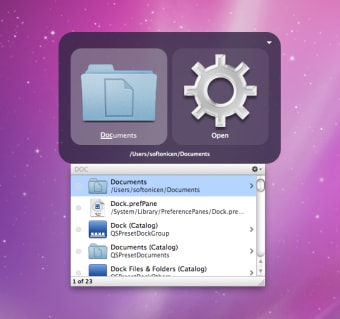
Prior to this experience on Windows, I was a Mac OS X "power user" enjoying Quicksilver[0][1] on Snow Leopard (10.6) through (Mavericks 10.9). It's mode of interaction[2] was very similar to Spotlight[3] built-in to modern macOS.
I also learned to touch type on that very same *MacBook while waiting for a plane in an airport terminal.
All this is to say that the concept of hitting a key and typing to launch an application felt very natural to me when I first encountered the Windows 8 UI. I never felt the need to use a traditional start menu, despite having clocked lots of hours on Windows 7, Server 2008 R2, and older versions. in the office. When Windows 10 brought back the traditional start menu, I only ever searched through it like I would have on a Windows 8 or MacOS system.
Recent benchmark testing[4] showed Windows 8.1 to be faster in many ways compared to Windows 10 and Windows 11. I was surprised someone actually did this, but not surprised at the results!
Perhaps one of the reasons why I preferred it more than Windows 10 and Winows 11 is the Control Panel was still very usable in Windows 8. As someone who worked on Server versions of Windows, the Control Panel was very much embedded in my muscle memory. The erosion of it in subsequent versions of Windows is the source of my growing pains. That, plus all of the popular reasons why Microsoft/Windows gets backlash today.
* The 2010 MacBook was advertized with a 10 hour battery life. Many years would pass before Apple would again advertize such a long battery lifetime. I had upgraded the RAM and swapped the optical drive for a second 2.5 hard disk, then re-installed Mac OS X in software RAID1 mode. It was extremely stable for many years until the day I decided to decomission it (ran 'sudo rm -rf /' at the Terminal). I.e., the type of stuff that would give Tim Cook indegestion.
[0] https://en.wikipedia.org/wiki/Quicksilver_(software)
[1] https://github.com/quicksilver/Quicksilver
[2] https://images.sftcdn.net/images/t_app-cover-s,f_auto/p/7e76...
[3] https://en.wikipedia.org/wiki/Spotlight_(Apple)
[4] https://meterpreter.org/the-20-year-showdown-why-windows-8-1...
Sorry.
I am having nightmares right now.