Termux
285 points
by tosh
7 hours ago
| 44 comments
| github.com
| HN
haunter
5 hours ago
[-]
One of my favorite piece of software was made by the guy with Termux on his phone [0], absolute insane https://github.com/9001/copyparty

0, https://www.youtube.com/watch?v=15_-hgsX2V0&t=885s

reply
mitkebes
3 hours ago
[-]
That's pretty funny, I use Copyparty a couple places, and never new it's origin.
reply
zahlman
1 hour ago
[-]
You might be interested in a previous HN submission about it: https://news.ycombinator.com/item?id=45984864 including the author's commentary: https://news.ycombinator.com/item?id=46056869
reply
pks016
1 hour ago
[-]
Best thing I saw this morning! I will have to check it out once I get home
reply
haunter
1 hour ago
[-]
It's incredibly good and runs on pretty much everything.

There is a read only demo here https://a.ocv.me/pub/demo/

reply
cfiggers
5 hours ago
[-]
Termux is the first app I install on every Android device I get my hands on. It's astonishingly capable.

I have a Bluetooth keyboard case for my Android tablet. All the time, I use Termux to ssh into my Linux machine over my home network and code on it in Neovim from my couch.

I don't bother with the default notes app on my phone. Termux + Neovim running vimwiki and syncing to a private GitHub repo is way better.

Most stuff you want at the CLI is in the Termux package repository. On the occasions when it isn't, you can install clang, make, cmake, ninja, whatever libraries you need, and build it from source. At that point most stuff just works.

Termux is incredible and single-handedly keeps me running Android.

reply
harvie
4 hours ago
[-]
I beleive Android 16 now comes with termux-like Linux environment that can be enabled via developer settings menu.
reply
push0ret
3 hours ago
[-]
Big difference! That's a full VM, while Termux is more like a Debian container. For most use cases you will have a better time with Termux, which also ships useful Android integrations such as clipboard and notifications.
reply
functionmouse
3 hours ago
[-]
Yeah but it sucks. There's a button in its settings to install a Debian chroot environment; gave it a go and it bricked itself, had to clear the app's storage and factory reset it.
reply
NoGravitas
3 hours ago
[-]
Yeah, I can always use the Android Terminal once. If I re-open it, it says it's corrupted, and has to delete and re-install its minimal Debian environment.
reply
getpokedagain
3 hours ago
[-]
Add to this list that it tends to not work while connected via a VPN. Not sure why but this makes me very skeptical of it.
reply
JoshTriplett
1 hour ago
[-]
Probably because their handling of VM networking isn't very robust.
reply
functionmouse
2 hours ago
[-]
that's sketch city. Why does it care? What are they looking for?
reply
gf000
3 hours ago
[-]
A bug in a not even beta program makes it 'suck'?
reply
Antibabelic
2 hours ago
[-]
I don't understand this comment. Yes, absolutely. Alpha versions of software absolutely suck. The end goal is making it not suck, but if it's full of breaking bugs your can't just say it doesn't suck just because they're expected.
reply
yjftsjthsd-h
2 hours ago
[-]
If it's not even a beta, then it can hardly be replacement for termux.
reply
fmajid
3 hours ago
[-]
It's extremely flaky and unreliable, however:

https://social-cdn.vivaldi.net/system/media_attachments/file...

reply
prettyblocks
29 minutes ago
[-]
Yes, it's good, but it doesn't have access to any sensor apis.
reply
JoshTriplett
52 minutes ago
[-]
I'm really looking forward to that being more usable, but it isn't quite there yet. The GUI especially.
reply
Aachen
4 hours ago
[-]
(it's unreliable, see second edit)

Does it? I've looked at it only briefly (like enabled it, waited a while for it to download something big, then got a basic shell) but it seemed much less capable than Termux. Can you get cell tower info or copy to clipboard for example, or use other Android APIs?

Edit: looked into it a bit more, /etc/issue says it's a Debian 13 (latest stable), apt works with sudo (this is a locked-down device where I don't have root permission on, why does it need a fake sudo to use apt?) but of course programs like wavemon are useless because Android doesn't let you access the WiFi interface. There's no settings besides port forwarding and resetting the "partition". I don't see any documentation or info on how/whether you can interface with the rest of the system in any way. Looking on the web for Android terminal or "Linux developer environment" (as the system settings calls it) is predictably useless and only results in Google's unrelated Android SDK or other terminal emulator apps

Edit 2: okay, beware of it: I was curious if the same "you can't make the OS not kill your script" problem also happened in this OS terminal and.. it's worse. So I ran `while true; do date >> latest.txt; sleep 10; done` to see how long it'd stay alive and then did some other tasks like turning the screen off and on, opening a navigation app and zooming into a dense city, and loading a few websites. Locked the screen once more for good measure and then unlocked and opened the terminal. Guess what? It's broken. Not just crashed: I simply cannot start it anymore. The only "error handling" (Fehlerbehebung it says) step it offers is to delete all data and start with a clean system. The stack trace says there's a nullpointer in TerminalWebViewClient, with the next line being in Trichrome. It's a web browser apparently

reply
yjftsjthsd-h
2 hours ago
[-]
> apt works with sudo (this is a locked-down device where I don't have root permission on, why does it need a fake sudo to use apt?)

It's a VM running normal Debian. Inside the VM, you do have root, and that sudo isn't fake.

reply
jsight
3 hours ago
[-]
YMMV, but I've had pretty good luck with just force closing it and launching again when getting errors like that. It doesn't necessarily mean the whole environment is corrupt, even though that is the recovery option that is presented.

It is very unreliable though. I hope Android 17 improves it, as other than the restart issues, I've generally found it to be very functional.

reply
cess11
4 hours ago
[-]
Even more reason to keep supporting Termux.
reply
firecall
4 hours ago
[-]
What keyboard case do you use?

My android phone is a Pixel 8 and that sounds cool :-)

reply
cfiggers
53 minutes ago
[-]
I actually have like, four different ones... :^))) I'm a bit of a keyboard fiend.

The main one I use with my Android tablet specifically is a no-name brand, knock-off "magic keyboard"-style folio case that I got on AliExpress for like, 45 USD. I ordered the English layout, I received the Spanish one (which is mostly the same but had additional legends for Spanish characters). Le sigh. It's AliExpress, I didn't bother contacting support.

For my phone, I have a really old Zagg one that was originally for an iPad. The iPad has long since died but the keyboard lives on. Woo!

The main keyboard I type on all day at my desk is a Logitech Pebble K380s. It can store three different connection profiles, which can be either Bluetooth or Logi unified receiver. So I have one of those profiles set to connect to my Pixel 8 via Bluetooth (typing from that now). Makes toggling back and forth between that and my desktop very smooth.

On a "real keyboard" (like this K380s) there's a dedicated Esc key. Most tablet folio cases don't have Esc. I found an app called "External Keyboard Helper Pro" that lets me rebind Caps Lock to Esc. That makes Neovim much more pleasant.

reply
Rygian
4 hours ago
[-]
My usecase for Termux: most pictures get backed up properly into the home NAS, but the sync process sometimes skips a few [1] (which is exasperating, but here we are still not migrated to Immich).

So I have a python script in the NAS that calculates the MD5 checksum of every photo and video, and generates a shell script that, when executed on the phone, will calculate the MD5 on the local device, and delete if it is equal to the NAS.

The generated shell script gets sent to the phone, then I execute it from within a Termux window, pointing at the DCIM folder.

I can free up tens of GB of memories with reliability in the face of a misbehaving sync algorithm.

[1] https://help.nextcloud.com/t/auto-upload-is-skipping-random-...

reply
jcynix
4 hours ago
[-]
With Termux I have rsync at hand, which can compute checksums, delete files after the transfer, etc. That's why I do my complete backup with Termux. And I sort the images on the phone into dated subfolders before syncing them.

And having tools like exiftool, ffmpeg, and ImageMagick among others available in Termux is wonderful.

reply
troyvit
56 minutes ago
[-]
Yeah same in fact that's how I discovered Termux. I had an rsync.net account and thought that since rsync and ssh are so ubiquitous it should be simple to set up back-ups from my android phone. Boy was I wrong. The android apps that support rsync were all janky or suspiciously closed. Termux + rsync + Termux API's job scheduler does the trick. I think it's a bit of a drain on my phone battery but I won't complain given I own my photo back-ups from top to bottom (though I rent from rsync.net)
reply
ksynwa
36 minutes ago
[-]
Are you sure all this is really necessary? I just use round sync to copy over the camera and whatsapp media folders over ssh/sftp to my SBC. Then once every several months I delete the files from these foldes which exceed a given mtime (using find in termux).
reply
overfeed
41 minutes ago
[-]
> I execute it from within a Termux window...

If you install Termux widgets, you can directly start the script from your Android launcher's Home screen.

reply
dizhn
4 hours ago
[-]
That nextcloud issue is quite weird and people seem to have had better luck with the sync app downloaded from places other than the Play store. I personally would lose any confidence in the app and use a completely separate thing to do the syncing if that happened to me. I actually did use the nextcloud client on pc a while ago and it was kind of fickle in other ways too anyway so I stopped using it.
reply
ktm5j
3 hours ago
[-]
I really like SeaFile for this kind of thing. It follows the "do one thing and do it well" philosophy. It's just file sync with some basic document editing features (markdown, .doc I think). Super fast and dependable, highly recommend.

https://www.seafile.com/en/home/

reply
thekoma
4 hours ago
[-]
How come you don’t just send the md5s to delete rather than the shell script?
reply
vasco
4 hours ago
[-]
I guess it's a more flexible design that allows to change the criteria for deletions in the future. You still need to calculate md5s on the phone either way.
reply
bergheim
3 hours ago
[-]
With how AI based dev is going, I'm guessing more and more people will discover and start using termux, tmux and the like.

Typing on a phone sucks, but at least modal modes (vim) and unexpected keyboard[1] makes it somewhat tolerable.

1: https://github.com/Julow/Unexpected-Keyboard

reply
zahlman
1 hour ago
[-]
I've been dreaming lately of a Switch 2-sized device with ergonomic handles on the sides, with buttons built into the handles that implement a chording keyboard (like how a braille writer works).
reply
jatora
2 hours ago
[-]
suffice it to say that you just changed my morning with this link lol. god i love this keyboard.
reply
devsda
1 hour ago
[-]
I mainly use it as an ssh client and run network tools like ping etc. It is on the list of must haves I install on a new device.

I just hope against hope that Google doesn't limit its functionality further and point us towards the new terminal app in the name of security.

reply
nickjj
5 hours ago
[-]
I use Termux to run SSH on demand, it's quite nice for rsync'ing files between my phone and desktop.

The on demand nature of it is a major selling point to me. When I open Termux and run SSH it's up, if I shut down Termux, SSH goes away with it. That and I can use rsync which is a tool I've been using for syncing files for a long time.

There's no need to run always-on tools like LocalSend or SyncThing, at least not for my use case. I have a little "sync" shell script on my desktop I can run to easily sync files "desktop TO phone" or "phone TO desktop".

reply
sejje
4 hours ago
[-]
Fwiw I use syncthing, but I don't leave it always on.
reply
pxc
3 hours ago
[-]
Since no one makes Android devices with hardware keyboards anymore, I almost never use this kind of software anymore. After getting burned by a couple of Kickstarter phones hampered by half-baked software and total lack of updates, the only thing I could rationally conclude is that Android as a productivity platform is a lost cause.

When Android was new, I very frequently used Termux and ConnectBot with my first few Motorola Droid phones. For a brief moment, I had a working phone with a great physical design only held back by an outdated chipset and being locked to Planet Computers' abandonware. I could touch-type at 80 WPM on an easily pocketable device! Termux shone there.

So many things about Android were not just more exciting in terms of potential when it was new, but actively better: wider variety of hardware, widely unlocked bootloaders, no remote attestation, etc. Termux sadly feels like a painful reminder of that to me.

reply
crtasm
2 hours ago
[-]
reply
Fluorescence
5 hours ago
[-]
I love termux. I can run my normal terminal environment - tmux, fish, just, git, zoxide, yazi etc. and build rust apps. With decent auto-complete/fuzzy-search, it's very ergonomic for only needing a couple of key presses to get things done. I'm impressed that TUI apps like yazi/nnn respond to touch. It's a very viable app platform for those inclined.

Out of curiosity, is there an equivalent on ios with that level of support?

reply
nasretdinov
5 hours ago
[-]
In iOS we can only use something like ish.app which emulates x86 and runs full Linux distro instead, with predictably much lower performance than Termux (due to JIT being banned in iOS apps), but without any restrictions Android has on the executables
reply
MarsIronPI
49 minutes ago
[-]
Why does Apple ban JIT? It clearly doesn't ban emulation inherently, so why is emulation OK but not JIT?
reply
maxkfranz
3 hours ago
[-]
iSH is great as an ssh client. It has a good font out of the box, so it displays tmux and neovim properly.

a-Shell should be faster than iSH for local stuff since the tools are compiled natively, but nothing on iOS, as far as I know, compares to Termux on Android.

reply
DrNefario
5 hours ago
[-]
I don't have an iPhone, but wouldn't UTM be better for that use case?
reply
nasretdinov
4 hours ago
[-]
UTM can't be installed from the App Store unfortunately, and without a developer license you are limited to 7 days for each successful on-device reinstall
reply
dudewhocodes
4 hours ago
[-]
Apple somewhat lifted the emulator restrictions on the App Store which means you can install UTM from here: https://apps.apple.com/us/app/utm-se-retro-pc-emulator/id156...
reply
nasretdinov
4 hours ago
[-]
Nice, I must've missed that. Downloading it right away :)

Edit: well, it's also very slow unfortunately. I believe iPhone CPUs either don't support virtualisation or they don't expose it (edit #2: it's the latter). Either way, QEMU is struggling quite a bit, and due to it being a GUI it's even slower than what iSH could do

reply
anasrin
5 hours ago
[-]
Best terminal emulator on Android, my day to day basis is note-taking (fzf, Neovim, Git) and SSH (when I'm too lazy to open up computer).

Also you can build some CLI or TUI using Go and compile using Android NDK and run it on Termux.

reply
jFriedensreich
2 hours ago
[-]
Important to note that termux, while it was always great and indispensable, is getting increasingly interesting now because android is getting full desktop mode at the same time as XR glasses (xreal, viture etc.) are becoming mainstream. You can have a linux desktop in your pocket everywhere without rooting, hacking or tinkering, just install termux and x11 server. While not all packages work, llms are increasingly powerful, just an example porting deskflow from a debian package to termux took about 4 hours max, something i would not even have had an idea how to start just 4 months ago.
reply
fermuch
21 minutes ago
[-]
I use my Meta Quest 3 with Termux & Termux X11 to run full desktop apps, and it works like a charm. No emulation, too! Native ARM64!
reply
antirez
2 hours ago
[-]
I would bet the popularity is due to coding agents. For the first time you can continue the work without typing much but just inspecting the output and provading further guidance with relatively short messages.
reply
jFriedensreich
2 hours ago
[-]
I bet thats true, but that use case will be much much better served by the native vm based linux terminal, not sure what sandboxing you can use in termux.
reply
mg
5 hours ago
[-]
Is Termux still needed, now that new Android phones have a full Linux available?

I keep reading on https://www.reddit.com/r/androidterminal/ about user experiences with it and it seems pretty great.

reply
basilikum
3 hours ago
[-]
Termux is just a terminal emulator. When you run programs in Termux they run natively on your Android system inside the normal Android sandbox of the Termux app. That has some limitations, for example software has to be compiled to use the paths of the Termux environment. Termux can't just install software into /bin and you can't write into /etc. So everything depending on anything more than the base Android system like dependencies installed by Termux has to be compiled specifically for the paths of the Termux environment. But it also advantages especially when you want a Terminal that is actually part of your Android system. You can just natively access the shared storage for everything Termux has permission to. You can also use the Android API out of Termux – for some things you need to install the Termux:API Addon app – and get stuff like GPS, SMS and contacts.

The Android Terminal app is just a view to a full VM. If you want a more traditional Linux system on your phone alongside Android instead of a Terminal in Android, essentially having a second system just conveniently running on the hardware of your phone, then that's for you. However it does also use more storage.

reply
jhbadger
5 hours ago
[-]
I've tried both, and Termux is still far better. At least when I tried it a couple of months ago, the Linux terminal lived in its own sandbox isolated from the normal Android directories. Yes, I get how this might be "safer", but it means I can't move files around in the command line which is my primary use of Termux (I can't stand using a GUI to arrange and rename files)
reply
gf000
3 hours ago
[-]
/mnt/shared is mounted to see your downloads and the like, so you can manipulate them just fine.
reply
rini17
5 hours ago
[-]
Apparently the OEM must support it (the AVF virtualization).
reply
chocochunks
5 hours ago
[-]
The phone's hardware must also support it. It needs non-protected VM support which is available in Exynos SoCs but not Qualcomm which is why some Samsung phones have it but other arguably better phones don't (e.g, S25 Ultra VS. Flip 7).
reply
WinstonSmith84
4 hours ago
[-]
Right, I enabled it, and got that exact error when starting the Terminal app on my Xiaomi 15: "Non-protected VMs are not supported on this device."
reply
JoshTriplett
53 minutes ago
[-]
Anyone know if the Samsung Z Trifold has VM support that works for the Android Terminal?
reply
esperent
5 hours ago
[-]
Interesting, first I've heard of that. It's android 16+ apparently. My Galaxy S21 FE is on Android 16.

I searched "Linux" in the settings and it found this experimental "Run Linux Terminal on Android" toggle... Which doesn't work. Tapping it won't turn it on. Oh well.

reply
elcapitan
5 hours ago
[-]
Oh wow, thanks for mentioning this, I totally missed that this was introduced.
reply
nicman23
4 hours ago
[-]
it is trash on the hw acceleration side, while termux has vulkan linux to vulkan android wrappers - which in future will probably do hw encode and decode as well
reply
306bobby
4 hours ago
[-]
Using ffmpeg packages in termux you can already access the mediacodec apis for hw accelerated encode/decode
reply
mystifyingpoi
5 hours ago
[-]
As you say, it is still very useful for older phones. Only the newest top-of-the-line ones got the real thing.
reply
prmoustache
5 hours ago
[-]
last time I tried the linux terminal running on a vm was buggy and slow.
reply
bluebarbet
5 hours ago
[-]
Honest question, as a heavy desktop TUI user who has had Termux installed for years. A terminal (emulator) is a keyboard-based environment. How on earth are all you fans making it work with a tiny touchscreen?
reply
mjmas
4 hours ago
[-]
I have Unexpected Keyboard which gives me most keys including Alt, Ctrl and Esc as well as F-keys.

https://github.com/Julow/Unexpected-Keyboard

reply
dotancohen
4 hours ago
[-]
I often use a Bluetooth keyboard with Termux. But as a mechanical keyboard affectionate with a veritable museum of ergonomic and mechanical keyboards, the Samsung S-Pen is good enough for terminal work. I use SSH, VIM, and lately Org mode in Termux. If I'm at a desk I still use a Bluetooth keyboard, but if I'm out then the S-Pen is a fine enough substitute.

Right now I'm on an S24 Ultra, before that a Note 10 Lite, and before that another Note 10 Lite.

reply
darkstarsys
3 hours ago
[-]
I just got an S25 Ultra. How do you use the S-Pen with termux? I do have handwriting enabled in gboard and the S-Pen works for writing regular text. But can it write special characters, ctrl/alt, or something else to go beyond what regular gboard gives? (I also have Unexpected Keyboard for Emacs, but S-pen input seems like a cool idea if it can work around limitations of gboard)
reply
dotancohen
4 minutes ago
[-]
For bash commands I hunt and peck with it. I use glide typing for English and Hebrew text. For special keys Termux displays a bar just above the keyboard. I don't remember if that's something that I had to configure.
reply
mklein994
2 hours ago
[-]
For me, it was how I learned Vim. The awkward keyboard pushed me towards learning more efficient keystrokes, so now I'm very comfortable with Vim.

I would learn it on the bus, and at the time I didn't have a data plan, so I could only access things I had already downloaded. The `:help` documentation is very thorough.

reply
jhbadger
3 hours ago
[-]
There are better software keyboards than the default that you can install. I use Unexpected Keyboard, which supports ctrl, alt, tab, and other keys needed for Unix work.
reply
jcynix
3 hours ago
[-]
First of all, typing shell commands isn't that annoying on the tiny touchscreen. Caveat: heavy terminal users here ;-)

Then you can attach a Bluetooth keyboard. And you can import scripts (Perl, Python, Shell, ...) via ssh from other devices. Last but not least, you can start an ssh server on the device and use Termux from your desktop or laptop. And you can start a web server, to access your device's media files, etc.

reply
ifelsewhy
4 hours ago
[-]
This is why I'm looking forward to the new Android devices with keyboards. I can't do anything productive on a touchscreen.
reply
dotancohen
3 hours ago
[-]
You might want to look at the S-Pen. I can not stand the on-screen keyboards with my fingers, but they are not so bad with the S-Pen. That's the only reason I still buy Samsung devices.
reply
tossit444
3 hours ago
[-]
Staring very close at the screen.
reply
genezeta
4 hours ago
[-]
Portable Bluetooth keyboard.
reply
ezequiel-garzon
4 hours ago
[-]
Sessions tend to be way shorter for me, but it's great to have.
reply
poolnoodle
4 hours ago
[-]
Tiny fingers or bluetooth keyboards
reply
cess11
4 hours ago
[-]
I use PentiKeyboard, it can send basically all the byte sequences I'm accustomed to having available plus it has a shortcut for sending ctrl+b to tmux.

https://play.google.com/store/apps/details?id=de.software_la...

Either that or I connect a wireless physical keyboard.

Edit: The killer feature of Penti is that it is transparent and allows you to put the 'buttons' where it is convenient to place the fingertips. Unlike regular software keyboards which hide half the screen and have 'buttons' that are pretty much thumbs-only. Since I code a lot I'm not particularly keen on mainstream next-word-guessing either.

reply
maxamillion
1 hour ago
[-]
Galaxy Tab S11, in DeX Mode, with the Book Cover Keyboard Slim, running Termux and Tailscale is a great companion device to ssh to any system on my tailnet so I can do real work on the road. So good. I donate monthly to Termux, you should too. :)
reply
MarsIronPI
53 minutes ago
[-]
Does anyone know of an X server or Wayland compositor app for Android that gives each window its own Android window (or whatever they're called on Android)? IMO that'd mix perfectly with Termux for GUI apps.

Yes, I know Termux-X11 exists but that app is a single Android window (again, I'm not sure if that's the right term) for all X windows. I'm wondering if there's an app that creates an Android window for each X window.

reply
mystifyingpoi
5 hours ago
[-]
Termux is also an excellent solution for downloading videos from YouTube and similar sites, due to the fact that yt-dlp works really well (and using mobile data makes it easier to avoid IP bans, most of the time anyway).
reply
Erenay09
5 hours ago
[-]
You can use an easier way for yt-dlp:

https://github.com/deniscerri/ytdlnis

reply
cess11
4 hours ago
[-]
How do I share the files back to Termux from this 'app'?
reply
MarsIronPI
47 minutes ago
[-]
If you disable SELinux, I believe you can also set up the MPV app to use Termux's yt-dlp executable.
reply
mikewarot
2 hours ago
[-]
I use Termux to host my 11/780 VAX/VMS system on my cheap ass Motorola phone, thanks to SimH.

Beware of one thing, though... if you upgrade Termux, or remove/reinstall, you lose everything inside that "linux" system. I lost my first VAX setup that way. 8(

reply
ratrocket
3 hours ago
[-]
Adding to the many other great uses of termux already here, the most useful lately for me is running Syncthing. After the "drama" with the Syncthing android client (my understanding: official development stopped due to onerous requirements from the Google, then the most popular fork was transferred to a new owner in a less-than-fully-trustworthy manner), being able to just run syncthing from the command line is a breath of fresh air.

I highly recommend using Unexpected Keyboard along with termux (a recommendation I myself almost certainly got from HN).

reply
kid64
56 minutes ago
[-]
I remember hearing something about the circumstances of that transfer, do you have a link/reference. Also, when you run Syncthing (the normal build I assume, without the Android wrapper), are you able to reliably prevent Android from killing it?
reply
alejoar
5 hours ago
[-]
Termux has saved me countless times over the years.. One of the most powerful apps on my phone, that's come through whether I needed a quick SSH session to put out a fire or to get some real work done on the go.
reply
dharmatech
5 hours ago
[-]
An experiment of using Python Textual to implement a phone app intended to run in Termux:

https://youtu.be/sTj1FalZMVw?si=oq7uXCofjTGZO1F4

reply
OsamaJaber
5 hours ago
[-]
Sooooo underrated Incredibly handy when you're away from your machine
reply
r17n
4 hours ago
[-]
Everyone posting seems to love this. Can folks provide some of their use-cases?
reply
jcynix
3 hours ago
[-]
I take monthly notes with the excellent app Markor, keep my daily diary with the nice app Diary and share lists, notes, todos with family members via Joplin (stores data on my own WebDAV server).

So almost everything is text (with markup/markdown) and can thus easily be synced and merged between devices via rsync, ssh and perl or shell scripts.

Example: when I want to look up notes in either markor's or diary's files, that's easily accomplished with a shell script, e.g.

  cd ~/storage/shared/Documents/markor
  if [[ $# == 0 ]] ; then
     exec zsh
  else
    grep -i "$@" **/*(.) | less
  fi
Instead of grep I could even use agrep to handle typos. I can start a simple web server on the phone or tablet, if needed:

  python -m http.server $PORT --bind 0.0.0.0
and view media files from another device (mobile, desktop, laptop, … whatever.

And there's exiftool, ffmpeg, ImageMagick, scripting languages, all in reach, wherever I go.

Markor: https://f-droid.org/packages/net.gsantner.markor

Diary: https://f-droid.org/packages/org.billthefarmer.diary

reply
starkparker
2 hours ago
[-]
In a previous job I had a "kick the server" button configured from a Termux integration that would automatically SSH in, punt some logs my way and kill some commonly misbehaving services we didn't control, and then failing that reboot. As long as my phone was on the VPN it was generally a one-click triage.

For a couple of weeks I'd automated myself out of on-call by hooking that to an automation that fired every time I got paged. I wasn't brave enough to keep it going in the long term, but it was the best two weeks of sleep I had at that place.

reply
mitkebes
3 hours ago
[-]
Some basic uses: SSH, wake-on-lan, downloading youtube videos, watching anime through ani-cli, coding, pen-testing, setup your phone as a file server through copyparty, setup a full linux desktop on your phone, etc.

For anyone who already is familiar with a linux terminal, termux is a great way to use a lot of the open-source tools you're already familiar with instead of trying to find a dozen different apps instead (that all probably show ads, spy on you, or require a subscription). There are also several apps that use it as a necessary backbone for their functionality, and require it to be installed.

reply
pawelduda
4 hours ago
[-]
I use it all the time to SSH into my workstation and check on long-running tasks, code, etc.

- Using vim/neovim is way better than I'd expect on a phone keyboard, because you can move around faster with less keypresses.

- My terminal sessions are wrapped in tmux, so switching between devices is seamless (tmux panes resize without any problems to match your device dimensions/aspect ratio as soon as you interact with the terminal - nothing ever breaks). You can do the pinch gesture to change the text size, depending on what you need to see at the moment.

- Both devices are using tailscale, so all I need is cellular data connection. For low quality network coverage I use mosh, which makes the session truly unkillable and makes sure it will recover when the connection comes back, albeit I ran into some annoying limitations with text scrollback.

With the recent development of agents, it becomes even more effective, since I can just open up claude session, type the prompt and have the agent do the heavy-lifting (mostly writing large chunks of code). This greatly compresses the amount of text you'd have to type and makes phone-only coding more viable than ever.

reply
dhoe
4 hours ago
[-]
It's my primary environment for anything code related (I'm not a developer by profession). Cheap tablet in vertical model, cheap keyboard, termux, tmux, Claude Code with instructions to offload anything more resource intensive to a 5$ VPS. I'll not claim it's perfect - occasionally Claude does try to run something that crashes termux, and the keyboard mappings are not ideal - but it's good enough that I haven't needed a laptop in over a year.
reply
bluebarbet
4 hours ago
[-]
>it's good enough that I haven't needed a laptop in over a year

Not to single you out but I worry about this trend. As things stand, free (FLOSS) privacy-respecting computing remains all but impossible on the mobile platform. If now Termux is encouraging even geeks to abandon the desktop, that seems like a net negative.

reply
cess11
4 hours ago
[-]
To me it allows me to interface with my phone as if it was an actual computer and not just a locked down entertainment autoscroller.

I take notes, do programming, remote into computers, investigate networks, download and play back music/podcasts/web radio, surf the web with w3m, run background services, pretty much anything I'd use a terminal emulator for on a laptop computer.

Eventually I expect more people to move off Discord and the like so I can easily have them in terminal chat software instead.

reply
twism
4 hours ago
[-]
I've tried Termux but use the old irssiconnectbot (https://github.com/irssiconnectbot/irssiconnectbot) but with slight modifications over the years since its open source... along with an also modified hackerkeyboard (https://github.com/klausw/hackerskeyboard) to support my workflow which is heavy on emacs and GNU Screen.

The colors/graphics seem to be better on irssi and can also handle all the emacs and gnu screen keyboard chords and escape sequences.

I try every android terminal but nobody is really thinking about running more than simple commands.

reply
bear330
4 hours ago
[-]
I also really like Termux. When I was developing https://github.com/nuwainfo/ffl (a tool similar to croc, but the receiver uses a browser and doesn't need to install anything), it was because I wanted an easy way to get things off my phone. I actually packaged ffl—which is pure Python—into an APE just to make it compatible with Termux. Although many people here use ssh, rsync, or solutions like copyparty, I prefer my own minimalist solution: just one binary to transfer whatever I want. Anyway, Termux is cool.
reply
yjftsjthsd-h
2 hours ago
[-]
reply
ce4
4 hours ago
[-]
I use it for lots of stuff, remote scanning from an old Canon flatbed scanner attached to my NAS (powered by a really ugly phone-local bash script, nothing else), rsync, renames (or the like using one liners), ssh tunnels to different destinations (to circumvent IP blockages) and of course YT downloads (using the source git folder and running it using "python -m yt_dlp $OPTIONS $URL" - when it breaks, a git pull is all it needs most of the time, I also have local patches that are not upstreamed)
reply
superjose
2 hours ago
[-]
I discovered it 1 week ago.

I don't know why I never tried this in the past! SSHing my machine and vice-versa!

Just figured out that I could use my computer's terminal to send to my android's clipboard via SSH.

Pair it with Tailscale and we have a beast!

reply
kjuulh
5 hours ago
[-]
Use it all the time.

I've got a wireguard setup from phone or tablet to my workstation. Using mosh with zellij and I can do all the development I want. Whether it is restarting a machine, or actually writing code, using claude code etc. It works really well

reply
kqr
4 hours ago
[-]
I have been using Termux to SSH to other machines for quite some time, but only relatively recently did I have a flash of insight: I can use Termux to write applications for my phone in Perl (!).

A year ago I used it to solve Advent of Code problems on my phone during my work commute. It was lovely. I have also used it to get access to a resampling calculator and a mental logarithm trainer on my phone.

reply
bitwize
48 minutes ago
[-]
Enjoy it while it lasts, folks. Android has since implemented restrictions on which binaries may be run from an installed app; any spawned processes must also come from binaries installed from Google Play.

Termux is currently grandfathered in because it's still built against the last API version not to have these restrictions (28?). But it's only a matter of time before that version starts throwing "This app was built for an old version of Android and may not work properly on new devices" errors and then, stop working altogether...

reply
timonoko
5 hours ago
[-]
I have webserver in Termux which is viewed in a watch.

Kinda difficult to explain. But Copilot says:

Provide a single-line weather summary (temperature, wind direction name + degrees, wind speed, symbol text) for use elsewhere (repo name suggests it’s for a clock/display).

https://github.com/timonoko/Supersaa_kelloon

reply
tetris11
5 hours ago
[-]
the only true way to experience Emacs on android
reply
Tiberium
5 hours ago
[-]
Modern Emacs isn't really meant to be used in a TUI, it has a very capable GUI. And there's a fully native Android port of that GUI.

https://sourceforge.net/projects/android-ports-for-gnu-emacs...

https://mstempl.netlify.app/post/emacs-on-android/ https://kristofferbalintona.me/posts/202505291438/

reply
timonoko
4 hours ago
[-]
Try this:

  (menu-bar-mode -1)
  (setq inhibit-splash-screen t)
  (setq inhibit-startup-echo-area-message t)
  (global-set-key "å" 'hippie-expand)
  (global-set-key "∆" 'toggle-truncate-lines)
  (global-set-key (kbd "<f12>") 'toggle-truncate-lines)
  (xterm-mouse-mode 1)
  (global-set-key (kbd "<mouse-5>") 'scroll-up-command)
  (global-set-key (kbd "<mouse-4>") 'scroll-down-command) ;
  (global-set-key (kbd "<wheel-up>") 'scroll-up-command)
  (global-set-key (kbd "<wheel-down>") 'scroll-down-command) ;
  (setq case-fold-search t)
  (setq-default truncate-lines t)
  (setq sort-fold-case t)
  (autoload 'scad-mode "scad-mode" "A major mode for editing OpenSCAD code." t)
  (add-to-list 'auto-mode-alist '("\\.scad$" . scad-mode))
  (require 'scad-preview)
  (global-set-key (kbd "Å") 'dabbrev-expand)

  (add-hook 'python-mode-hook 'whitespace-mode)
  (setq whitespace-line-column 128)
  (custom-set-faces
   '(default ((t (:background "#000000" :foreground "#ffffff"))))
   '(whitespace-space ((t (:background "black" :foreground "blue"))))
   '(whitespace-tab ((t (:background "black" :foreground "blue"))))
   '(whitespace-newline ((t (:background "black" :foreground "blue"))))
   '(whitespace-empty ((t (:background "black" :foreground "grey50")))))
reply
Antibabelic
5 hours ago
[-]
Not really? The Android version of Emacs is perfectly fine.
reply
goodburb
2 hours ago
[-]
You can now run Docker images in Termux with Udocker/proot[0], the disk IO can be a bottleneck for large databases when using proot.

Tailscale works with "--tun=userspace-networking" [1].

I had it running on an old phone as a Frigate server with a solar powerbank in remote area, using the 4G as a failover. The uptime is almost a week without solar. Attiny hooked to the power button and a photodiode on the phone flash [2] (blink per minute) used as a watchdog for shutdowns/hangs to hardware reset. The button cap is removed without disassembling the phone.

Old phones are still more efficient than most off the shelf SBCs, especially under load. ~3W compared to 12W with a Pi5 in the same performance ballpark.

[0]: https://github.com/George-Seven/Termux-Udocker https://github.com/indigo-dc/udocker

[1]: https://tailscale.com/kb/1112/userspace-networking

[2]: https://wiki.termux.com/wiki/Termux-torch

reply
ramblin_ray
3 hours ago
[-]
What's the difference between this and Termius, especially for those who are just ssh'ing into their home machines?
reply
smetannik
3 hours ago
[-]
Termius is SSH client. Termux is basically a terminal emulator + package manager. You can run Node, Rust, Claude Code locally on your phone.

As an example - I used it to do Rustlings every day I commute on a subway. NYC subways don't have mobile network coverage, so I can't just SSH there into a remote machine.

reply
_sinelaw_
4 hours ago
[-]
It even runs Fresh so you can have a mini VSCode-like experience on your phone (pkg update && pkg install fresh-editor)
reply
alance
4 hours ago
[-]
Fwiw termux + rsync for android phone backup (eg rsync /storage/emulated/0/) will grab most things.
reply
boneitis
4 hours ago
[-]
Another nifty utility to use in tandem is scrcpy[0].

Inside or outside of Termux, it allows you to interact with your android device in general from the comfort of your main computer/laptop over ADB.

It becomes a super multiplier for Termux when I don't want to deal with the hassle of connecting a separate keyboard to my android phone/tablet.

(A heads up, I have to use the `--render-driver=software` switch in order for scrcpy to work at all on my laptop.)

[0]: https://en.wikipedia.org/wiki/Scrcpy

reply
dizhn
3 hours ago
[-]
You need developer mode enabled for this right? Do you use any banking apps? The one I want to use for NFC payments doesn't work when developer mode is enabled. I am wondering if this is a global thing.
reply
boneitis
2 hours ago
[-]
Ah yes, I'm pretty sure developer mode is required.

My banking app works for logging in to check account balances, even despite having a rooted device. Though, I have not set up any kind of payment methods, Android Pay, etc.

reply
mimasama
4 hours ago
[-]
I use Termux for my OTP implemented in a bash script, I trust oathtool more than an app.
reply
bluebarbet
4 hours ago
[-]
So do I and this is a legitimately great idea for Termux.
reply
Ingon
5 hours ago
[-]
Termux is great - one of the ways I use it is to install the golang toolchain and compile/run connet.
reply
firecall
4 hours ago
[-]
There’s an app called Termux in the iOS App Store, but I’m guessing it’s not the same thing?
reply
alamortsubite
3 hours ago
[-]
Termux is the best of Android and sadly there's nothing like it on iOS. I'd ditch my Pixel today for the iPhone that's sitting on my desk collecting dust if there were.
reply
bryanrasmussen
4 hours ago
[-]
no, it's not, termux requires low level access to the OS that iOS protects against.
reply
mrsssnake
4 hours ago
[-]
No, it does not have any more access than any other app, as it work on unrooted devices too.

That said, it has to be compiled for older Android SDK level because newer levels prevent apps to run executables they downloaded on their own and not bundle with the APK, even isolated. Android may disable compatibility with the older SDK some day but for now it works.

reply
meatjuice
4 hours ago
[-]
Being able to use openclaw or github copilot remotely through ssh would be nice. I think there should be a dedicated interface though, typing into termux using on-screen keyboard is a real pain.
reply
GlenTheMachine
5 hours ago
[-]
“Extendible” —> extensible, I believe
reply
leephillips
3 hours ago
[-]
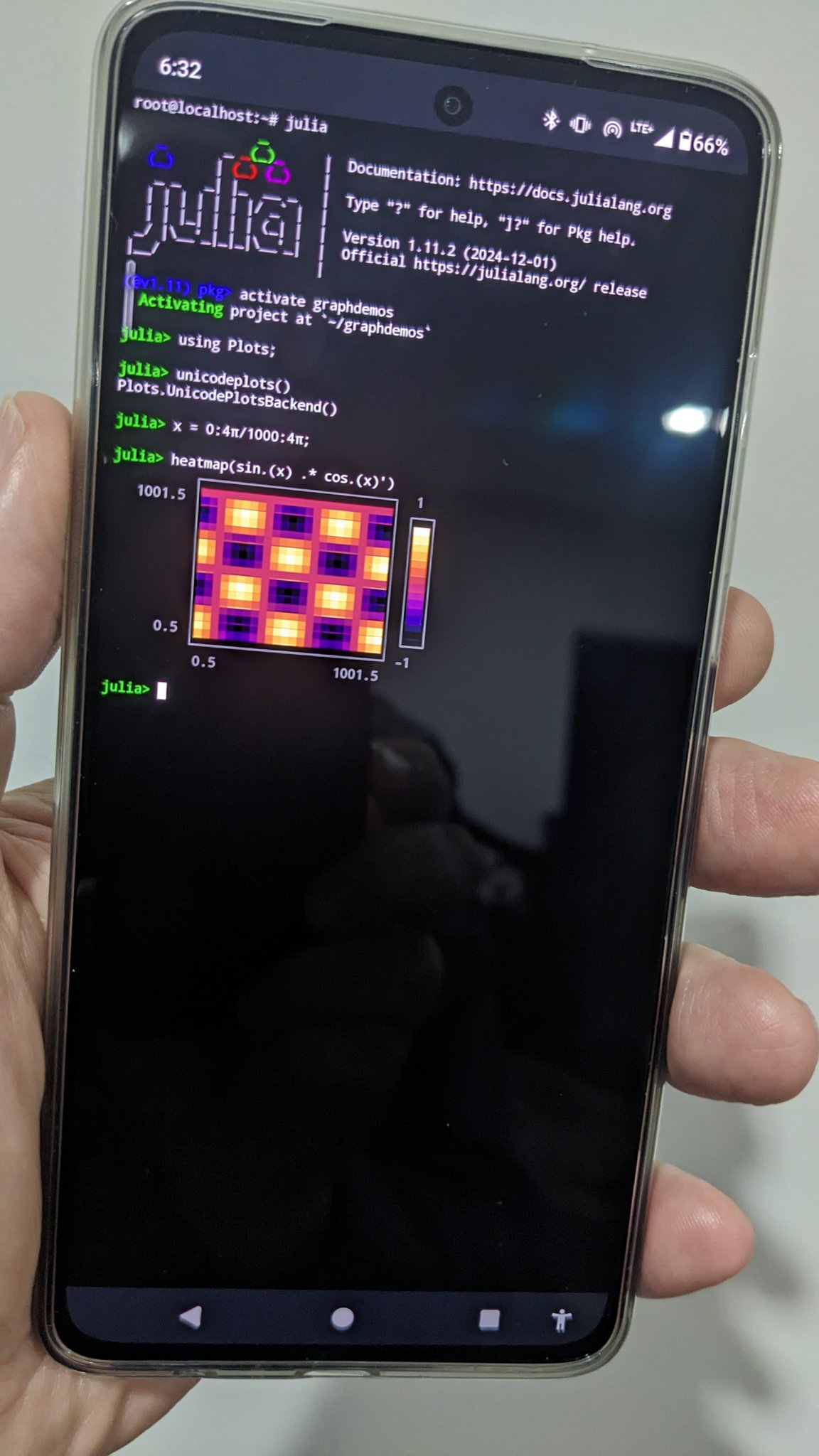
I use it to run Julia on my phone: https://lee-phillips.org/juliaOnPhone.jpg
reply
eigenspace
2 hours ago
[-]
Do you have instructions somewhere for getting this to work? I've tried installing julia on termux a few times with no success.
reply
leephillips
2 hours ago
[-]
I just downloaded the archive (from the usual Julia downloads page) for ARM on the phone and put a link to the binary in /usr/local/bin — same as on Linux desktop. But I did this in the proot Debian environment.
reply
kirito1337
2 hours ago
[-]
the best thing ive ever downloaded on a phone
reply
PlatoIsADisease
5 hours ago
[-]
I forget about how many Android only Apps I've used through the years. Emulators, fdroid, pulse wave generator(not sure if iphone has it, but they don't have aux ports anymore), termux, probably more... I don't think about it.

That all said, I've heard news about Android getting degraded by Google to be more like Apple. Hope its rumors, but at least I had a good decade+.
reply
1vuio0pswjnm7
3 hours ago
[-]
Imagine Termux with a "VPN mode" so that privileged ports could be forwarded
reply