IBM didn't want Microsoft to use the Tab key to move between dialog fields
171 points
1 hour ago
| 18 comments
| devblogs.microsoft.com
| HN
ch_123
1 hour ago
[-]
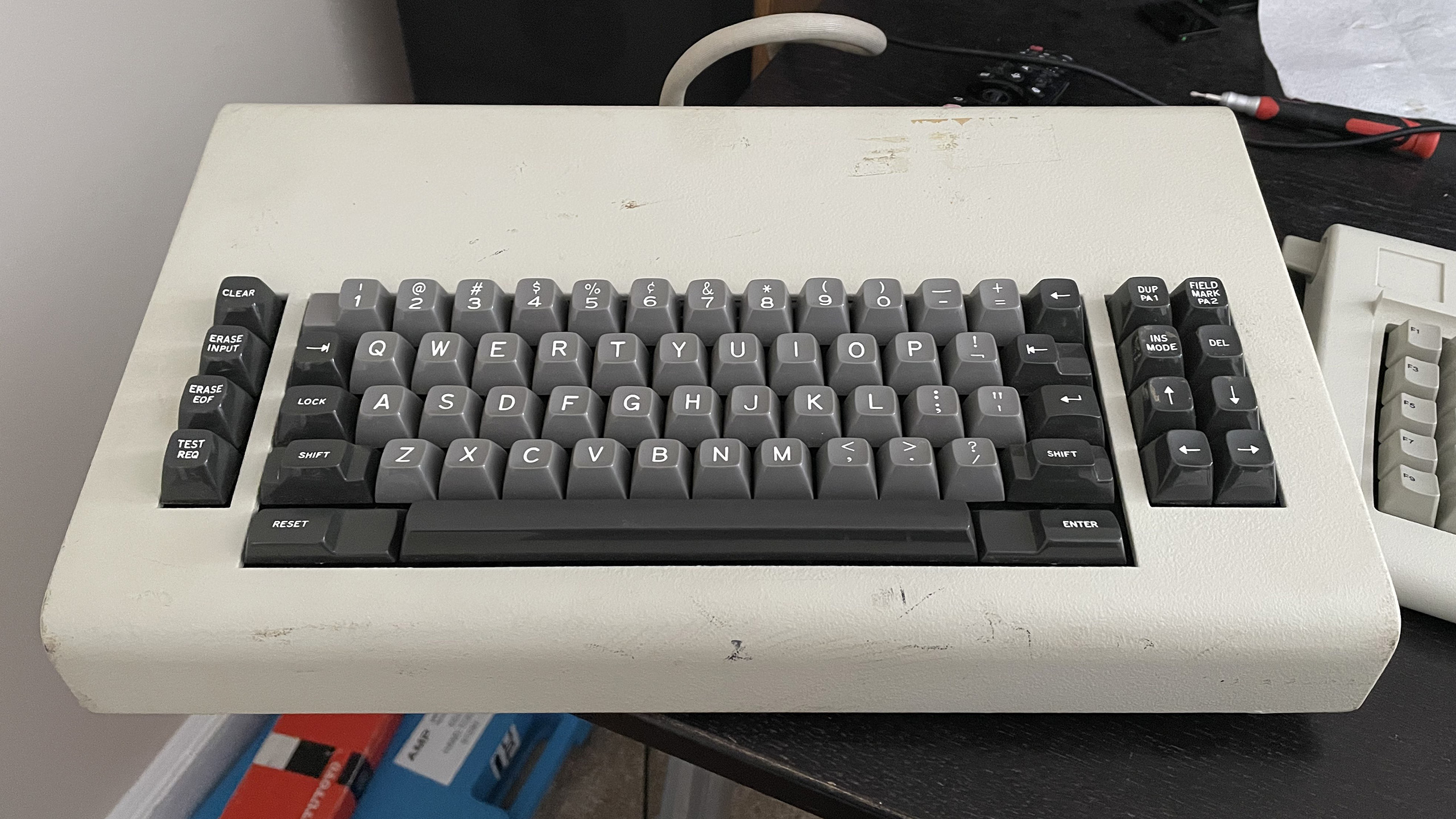
I find this story odd because IBM was consistent with their keyboard nomenclature across multiple products, and the 3270 series mainframe terminals used the Tab key, located in the same place where you would find a tab key on a modern keyboard, to move the cursor to the next field.

https://www.bitsavers.org/pdf/ibm/3278/GA27-2890-4_3278_Disp... (Page 73 of the PDF)

As an aside, it's worth noting that moving between fields was important enough on IBM terminals that they had a dedicated "back tab" key located on the opposite end of the keyboard to the tab key. On the original IBM PC, they decided to combine both functions into a single key. As a result, the tab key on the classic PC keyboard features the symbols for both forwards tab and back tab on the same key, the back tab symbol being on top to indicate that you need to hold down shift to use that function.

EDIT: The 5250 series terminals used the terms "Field Advance" and "Field Backspace" instead of Tab and Back Tab, but otherwise they used the same symbol on the keys, and the keys were located in roughly the same position as the 3270 series. Reference: https://www.bitsavers.org/pdf/ibm/5291/GA21-9409-0_5291_Disp...

reply
ChuckMcM
55 minutes ago
[-]
Having worked at IBM, I would guess that using the tab key in this way was part of a patent they were pursuing and Microsoft's use would show this to be 'obvious' and thus not patentable. But that is just a guess.

In the 80's IBM had a whole class of high level technical people called "Systems Engineers" whose entire job description was to opine on the merits of any given system. Not write systems, not debug them, and certainly not to explain them, it was simply to opine "you're doing it wrong."

reply
rbanffy
3 minutes ago
[-]
> I would guess that using the tab key in this way was part of a patent they were pursuing and Microsoft's use would show this to be 'obvious' and thus not patentable.

IBM insisting it not to be tab wouldn’t make sense. Microsoft was working for them and the programs should adhere to the CUA (Common User Access) standard.

reply
MoonWalk
52 minutes ago
[-]
Microsoft is suffering from the lack of such a group today; they're definitely doing it wrong, where "it" is pretty much everything... except pissing off users.
reply
coredog64
21 minutes ago
[-]
Microsoft could implement the "Am I doing it wrong?" check via the shell script `/bin/true`
reply
Henchman21
6 minutes ago
[-]
They’d need to install WSL2 first though!
reply
rbanffy
3 minutes ago
[-]
A TRUE: device?
reply
FartinMowler
5 minutes ago
[-]
What?!?! I was an IBM Systems Engineer in the late 1980s / early 1990s and that was nothing like my job description.
reply
thaumasiotes
43 minutes ago
[-]
> I would guess that using the tab key in this way was part of a patent they were pursuing and Microsoft's use would show this to be 'obvious' and thus not patentable.

Something that's bothered me about user-facing patents:

Let's assume that the idea of using a keyboard key to move between input fields in a software form is not obvious, and in fact is a brilliant stroke of genius the likes of which the world is not likely to see again. If that one guy hadn't been born, we would have gone thousands of years with no method, keyboard-based, mouse-based, or otherwise, of moving from one input field to another input field. Every piece of software would use nonconfigurable timers, and you'd just have to hope you could type fast enough.

I don't see what the hypothetical benefit of extending patent protection to this brilliant idea is supposed to be.

Say you're the company who comes up with the idea. You can benefit by including it in your product, where all your users can see it. In other words, the benefit you get from coming up with this idea is that you can publish it for the world to see, and that's the only way you can benefit from it. A usability feature that your users cannot use or know about doesn't increase usability.

Even though the idea isn't obvious, the implementation is. If you disclose your brilliant idea, everyone will copy it and your advantage in the marketplace will be transitory.

So... what is the purpose of giving you a patent? That cripples the marketplace, but it fails to realize the benefit of patents, publication. Publication necessarily had to happen anyway.

reply
pavlov
5 minutes ago
[-]
> “a brilliant stroke of genius the likes of which the world is not likely to see again. If that one guy hadn't been born, we would have gone thousands of years with no method”

But that’s not the criteria for granting a patent. It doesn’t have to be a stroke of genius. It can be something that many people could invent at the particular moment of the filing (as evidenced by many cases of near-simultaneous patent filings, like Daimler and Benz competing for the ICE in the 1880s). It just needs to be demonstrably novel.

I’m not saying tabbing back and forth through dialog fields qualifies, but then again it’s hard to place oneself in 1980.

reply
toast0
20 minutes ago
[-]
> A usability feature that your users cannot use or know about doesn't increase usability.

Cannot is maybe doing a lot there. There's plenty of usability features that aren't really obvious or apparent unless you look very closely. Ex: pinball machines have timed shots, but there's almost always a grace period so if you contact the ball with your flipper around when the timer hits zero and it makes the shot, chances are you'll get credit for it even though the timer expired. That's a usability feature most users won't ever notice. At WhatsApp, I would never send an S40 user a verification code where the 4th digit was 8, because if you got a text message with 123-890, s40 would turn -8 into an 8th note emoji; until today, probably 3 people knew that ... but it dramatically improved usability.

> Even though the idea isn't obvious, the implementation is. If you disclose your brilliant idea, everyone will copy it and your advantage in the marketplace will be transitory.

> So... what is the purpose of giving you a patent? That cripples the marketplace, but it fails to realize the benefit of patents, publication. Publication necessarily had to happen anyway.

If I had gotten a patent on the 'avoid -8 in verification codes', then the technique would have been public for everyone to see. So publication for exclusivity / forced licensing is an exchange of value between society and the inventor. Of course, avoid -8 is pretty obvious, when someone testing the s40 client complains about getting an 8th note in their verification code message.

For an invention that must be disclosed to be used, society isn't really getting anything in return for exclusivity. Maybe promotion of progress, theoretically, I guess, in that whoever thinks of it first gets paid; leading more people to think about things?

reply
WalterBright
3 minutes ago
[-]
IBM also infamously patented the XOR cursor.
reply
philipallstar
26 minutes ago
[-]
Presumably it's to give you an advantage for putting in the work to develop it for a period of time.
reply
Onavo
41 minutes ago
[-]
You can say the same about swipe to unlock and that had been litigated to death.
reply
thaumasiotes
39 minutes ago
[-]
I did say the same about swipe-to-unlock:

>> Something that's bothered me about user-facing patents

reply
Animats
49 minutes ago
[-]
Here's a real IBM 3270 keyboard.[1] Note the "Next field" key on the left, and the matching "Previous field" key on the right.

The IBM 3270 was a device for filling up forms. The mainframe sent the terminal a form with blanks, and the terminal let the user fill in the blanks. The terminal hardware prevented the user from overwriting the static parts of the form, and could apply some other form constraints, such as numeric fields. That was all done by the terminal. When the form was filled in, the user pressed ENTER, and the completed form was sent to the mainframe as one transaction. This approach let one mainframe service huge numbers of terminals. The user never experienced delays while typing and could type at full speed, often without looking.

PCs didn't have that usage model. The PC crowd was thinking "typewriter". One of the first terminals for home computers was called the "TV Typewriter".

Web forms do have that model, but with less consistency.

[1] https://sharktastica.co.uk/resources/images/model_bs/themk_1...

reply
ch_123
25 minutes ago
[-]
Nitpick: The terminology used by IBM on the 3270 family (including the 3277 whose keyboard you shared) was "Tab" and "Back tab", not "Next field" and "Previous field".
reply
jll29
17 minutes ago
[-]
The SAP application model is such a form-based model (no surprise given that all five co-founders of SAP were ex-IBM consultants that were fired for moonlighting - specifically, for writing a payroll software for chemical giant ICI in assembler on ICI's mainframe in an extended night action...).

SAP call their forms "dynpros" (dynamic programms), and the reslting interactive mode of processing "realtime/dialog programming" as opposed to "batch processing". This all looked very IBM 3270-"inspired" (and so was the SAP logo made up of IBM blue with the well-known stripes...).

reply
logickkk1
33 minutes ago
[-]
Funnily enough, IBM had already published this. CUA explicitly says tab and backtab move between fields.

so they spent seven layers of management escalating against their own standard: https://archive.org/details/ibmsj2703E/page/n13/mode/2up

reply
sedatk
47 minutes ago
[-]
From what I remember, there were two "Enter/Return" keys on IBM 3270 terminals. One was the regular "Return" key we have today, which just advanced to the next field, and didn't submit the form. There was also another "Enter" key where the Right Ctrl key is today, and that submitted the form. So, I presume, instead of being against Tab key, IBM might be against "Return" to be the form submit key as people who use 3270 would expect it to advance to the next field.

And that was true for many DOS programs. Pressing Return would just go to the next field, not submit the form. That was one of the things that needed some getting used to on Windows.

reply
ch_123
36 minutes ago
[-]
Your memory is correct, and it's interesting to note that on the IBM terminal keyboards, the Enter key was marked "Enter", and the return/new line key was marked "↵". On the classic IBM PC keyboards such as the Model M, the Enter key is marked "↵ Enter". I believe IBM chose this to convey that the Enter key on the PC was both an "Enter" _and_ "Return" key in one. As you say though - individual applications got to chose what that meant in practice, leading to inconsistent behavior.
reply
MoonWalk
54 minutes ago
[-]
Also conspicuously missing from the story is what key IBM DID want to use. I mean... that's the first question you'd ask!

Lame.

reply
yndoendo
8 minutes ago
[-]
It looks like it they wanted to use their existing special field management keys (field advance and field backspace) with tab being a different user experience. [0] Document does even use the word "Tab". "Field Backspace" seems to duplicate "Home" key usage under some conditions.

To be fair, Microsoft & Bill Gates are bad and quality user experience. "Ctrl+F" differs through their applications.

[0] https://archive.org/details/bitsavers_ibm525xGA2onDisplaySys...

reply
Tempest1981
51 minutes ago
[-]
Ctrl-F6 ?
reply
OhMeadhbh
45 minutes ago
[-]
Shift Ctrl F6
reply
SirFatty
59 minutes ago
[-]
And this is a great example of why I read the comments on HN stories... thanks for the info!

RIP /.

reply
donatj
1 hour ago
[-]
As someone who prefers tabs (I'm not looking to argue), I once asked Brendan Eich on Twitter why he prefers spaces. His answer was more thoughtful than I'd expected.

The tab key itself is hijacked by modern OS/UI behavior. It makes it complicated to actually type literal tab characters in certain contexts, particularly in the browser.

I still prefer tabs (and I'm a Go developer), but he is absolutely correct about that being a pain in the butt. For instance, try getting a tab character into the text area on Hacker News

reply
tuetuopay
3 minutes ago
[-]
Yeah but, even ones that don't use literal tab characters use the tab key to write code, right? RIGHT? Like, does he hit space N times?

I somewhat get the argument, but if you're writing code in the HN textarea you're doing something wrong (for code where tab/space matters anyways). Like, any code editor will use the tab key properly.

Though, it sills maddens me there's no somewhat universal tab-entry in OSes like we have with enter (somewhat because there's a mix of shift+enter, alt+enter and cmd+enter). All of shift/alt/ctrl tab are usually also hijacked.

reply
zzo38computer
47 minutes ago
[-]
It might be reasonable to have a separate key for "tab" vs "next field", as well as separate key for "line break" vs "send". (But, tab and line break are not applicable for all contexts.)

However, it might also be reasonable to have a key or key combination (some programs use ^V) to enter control characters as data rather than as commands.

It might also be a consideration when designing a new computer (which does not have to be the same as existing ones); I had thought about such things and may make such a consideration.

reply
dmonitor
13 minutes ago
[-]
Put it where the capslock key currently goes. Not sure what purpose it serves these days.
reply
tuetuopay
8 minutes ago
[-]
Its whole purpose is to be remapped as CTRL, as god intended.
reply
topham
28 minutes ago
[-]
The fact that most people think the Tab key is the correct choice is a perfect example of why it was not.

It had a purpose, and it got hijacked and made its actual purpose more difficult to use.

It's not dissimilar to Apples initial Touch Bar and then removing the Escape key.

Average user might never use that key; average developer doesn't got long without using that key for its purpose.

reply
INTPenis
1 hour ago
[-]
Non english speaker trying to wrap my head around what Brendan said to you.

I was once told that the tab key can be represented in different ways on different systems, and that's why spaces are safer because they're always represented the same.

Is that what Brendan was trying to say?

reply
jimbokun
1 hour ago
[-]
Literally try entering a "tab" character in a Hacker News reply. For me in Safari, it changes the focus to the "reply" button.

It's literally difficult to enter a "tab" character into many text entry fields and dialogs and applications, because it's used so often as a navigation key.

reply
Someone
51 minutes ago
[-]
> I was once told that the tab key can be represented in different ways on different systems, and that's why spaces are safer because they're always represented the same.

The main counter argument is that users have different preferences for the amount of indentation, so giving them control over that, just as they (nowadays) have control over the font used and window width, is a good idea.

The tongue-in-cheek counter argument is that fixed-width spaces are preferable over ‘normal’ spaces. They also give you more control over indentation, allowing, for example, mixing usage of THREE-PER-EM SPACE (https://unicode-explorer.com/c/2004) for indentation with FIGURE SPACE (https://unicode-explorer.com/c/2007) for right-aligning numbers.

reply
darkwater
1 hour ago
[-]
No. What Brendan said was:

> The tab key itself is hijacked by modern OS/UI behavior. It makes it complicated to actually type literal tab characters in certain contexts, particularly in the browser.

reply
bnjms
58 minutes ago
[-]
Tab key is both a control character moving the cursor to the next input and also an input representing the tab character as you see in a text editor.

Now that im thinking about it I’m convinced capslock would have been superior next field key and alt+capslock to be used for toggling capslock. But it’s not obvious to me capslock is even seen by the OS. It could be changed on the keyboards themselves.

reply
srdjanr
48 minutes ago
[-]
It definitely is visible, OS login screens usually warn you if caps lock is on when typing password
reply
bigibas123
48 minutes ago
[-]
Brendan Eich was making a point about the tab key also being used to switch to different text fields and buttons. This makes it difficult to type in certain applications. A space doesn't have that issue.

About your point of tab being represented different on different systems: It will always be ascii 9, how it's draw does differ between text editors but I consider that one of it's strengths for programming. Everyone can configure what an indent looks like for them, it makes reading code easier.

reply
setr
39 minutes ago
[-]
Little irritates me more than logging into a new system, opening up code in vim, and witnessing the insanity of tabs-as-8-spaces
reply
ville
1 hour ago
[-]
No, the point was that pressing the Tab key often does something else than inserts the tab character. Moves focus to the next input field, for example.
reply
kstrauser
1 hour ago
[-]
No, it's that it's extremely challenging to insert a literal tab character into anything resembling a web form.

You can configure your editor so that pressing the tab key inserts a tab character. Good luck with a web browser, or a UI where tab moves focus to the next control. The space bar basically always inserts a space character.

reply
sam_lowry_
1 hour ago
[-]
BTW, Douglas Crockford had an interesting argument in favour of spaces, see https://www.youtube.com/watch?v=En8Ubs2k1O8
reply
IshKebab
59 minutes ago
[-]
No he's saying if you're trying to write code in an edit box in a web browser (for example) and you press tab, instead of inserting a tab character it will move the focus to the next input field.

Bullshit reasoning though, because even people who use spaces for indentation don't do it by hammering the space bar - they also press the tab key. And of course in modern browsers we can give tab the expected behaviour.

The only logic I've ever heard for using spaces for indentation that actually makes sense and I vaguely agree with, is that lots of programmers do not give a shit about formatting code and even using spaces properly is often a bit too much for them.

That doesn't matter so much if you have an autoformatter though, so with the exception of Go I don't know why modern languages with widely used autoformatters don't use tabs.

reply
OhMeadhbh
40 minutes ago
[-]
There's also the fact that no one seems to have tab stops set the same way.
reply
LeoPanthera
36 minutes ago
[-]
That's a feature, not a bug.
reply
drabbiticus
20 minutes ago
[-]
As far as I'm concerned, it's a feature when the viewer controls the number of spaces per tab, it's a bug when someone else does (as is often the case online via css `tab-size`).
reply
sltkr
58 minutes ago
[-]
Control-shift-u, 9, space/enter, works on most Linux systems.

To explain: control-shift-u allows entering a Unicode character by its hexadecimal code. This presumably depends on the Input Method Editor (IME) in use, which is something I've never fully understood, but this seems to work widely across different desktop environments (Xfce, KDE) and display servers (Xorg, Wayland).

reply
connorboyle
1 hour ago
[-]
A great read, although I'd still like to know what IBM's reasoning for opposing this use of the Tab key was.

Is it because they didn't want Tab to be both an input and a control character? I.e. there are some cases where you can type a Tab into an input field, and there are other cases where you can't, and it's not immediately obvious which ones are which?

All the way in 2026, I would still be sympathetic to this view.

reply
bruce511
59 minutes ago
[-]
Personally I don't like the tab key for field change.

Firstly it was a breaking change from dos. Dos programs used Enter. And enter meant you could capture numeric data using 1 hand, since the numeric keypad has an enter key.

That means left hand can stay on the (paper) source. Right hand types. People got fast at this. (Really fast). And this pattern lives on in some programs kline Excel).

Lots of people (ie my customers) hated needing both hands on the keyboard. Lots of our programs allowed mapping of enter=tab.

I should be clear. It's not the "name" of the key that matters, it's the location.

The dual-use of the key is just an annoyance we live with. Sometimes the key behaves as a navigator, but in other cases it behaves as a spacer. Daft. (Enter would have the same problem. )

The best solution (by far) would gave been to add another key to the keyboard. Preferably in the numeric key pad. We got lots of new keys in that era. Hindsight says we should have added a "move on" key at that time.

reply
munk-a
37 minutes ago
[-]
If you're designing a text editor that's intended to run within a browser you need to fully break user expectations about the functionality of the tab key - there are two completely logical and intuitive roles it can serve in such an environment that are in conflict.

The same issue arises (with much higher frequency) with Enter and even in the modern world I'm sure we all have a pretty complex ruleset we've committed of when ctrl+crlf triggers a newline, or a message send and what the corresponding behaviors of a bare crlf and shift+crlf are.

In HN's editor shift+crlf and a bare crlf cause a newline creation and ctrl+crlf does nothing - but often times ctrl+crlf will trigger a form/message/whatever submission, shift+crlf often causes a raw newline insertion (even when in a form context) and then a bare crlf might do one - might do the other or might even do neither! Those are the common bindings but I have seen exceptions and inversions of bindings with shift+crlf causing form submission while requiring ctrl+crlf for raw newline insertion.

All this stuff is just super annoying and causes a lot of user friction (and for a long time MSFT's style guide was considered a seminal reference for best practices as ironic as they may seem to folks these days).

reply
deburo
1 hour ago
[-]
I now imagine a world where CAPSLOCK is used as "select the next input" and TAB as the character.
reply
OhMeadhbh
43 minutes ago
[-]
You mean the Control key to the left of the 'A' key? That's already the control key.
reply
hylaride
39 minutes ago
[-]
The way I interpreted it was that there was no complete "IBM" reason. I read it as "one person in the IBM bureaucracy stepped in and brought things to a halt, which highlights the cultural differences" considering it is a post about said differences.
reply
asdfman123
1 hour ago
[-]
I assume so. Obviously there are very different concerns if you're managing an organization with countless moving parts versus you want to build something for the user quickly.
reply
rwmj
59 minutes ago
[-]
Maybe because it would compete with IBM mainframes / 3270 terminal emulators?
reply
SoftTalker
1 hour ago
[-]
Weird because on the mainframe 3270 the tab key was used to move between fields, at least that is my recollection.
reply
epx
1 hour ago
[-]
+1, always thought it was an IBM standard, move with TAB and commit the form with ENTER.
reply
buggeryorkshire
1 hour ago
[-]
That's exactly my memory too, using a tab was second nature and it irked me when I went to gui apps with a mouse and the tab order was wrong, mainly with visual basic apps.
reply
EvanAnderson
47 minutes ago
[-]
I wonder about the midrange systems. I never used AS/400's, but I know they have the concept of a a "Field Exit" key separate from <ENTER>.
reply
kibwen
1 hour ago
[-]
It's been ages since I used an IBM green screen but I seem to recall that in our application Tab did move between fields, but I think there were also function keys reserved for this purpose.
reply
AbbeFaria
11 minutes ago
[-]
the Microsofties viewing their IBM colleagues as mired in pointless bureaucracy and the IBM folks viewing Microsofties as undisciplined hackers.

I work at MSFT, this made me chuckle hard. Microsoft must have been a very different company back then, because now I find myself and my colleagues mired in pointless bureaucracy via endless meetings, AI mandates, promotion theatre and the list goes on. I am decently paid but the bureaucracy is soul destroying.

reply
torben-friis
9 minutes ago
[-]
I've had to work with oracle people this very year and had the same style of interactions, funnily enough. They required constant input from higher ups in our mostly flat org, no matter how many times an annoyed VP had to email a "I agree with whatever my people say".
reply
OhMeadhbh
40 minutes ago
[-]
I think we should connect game controllers to all machines so the arrow buttons move you between fields, the 'A' key takes you up a level (in hierarchical menus), the 'B' key takes you into a subordinate menu. So to move between fields, you type some data, then take your hands off the keyboard, pick up the game controller, hit the right or left buttons, then put your hands back on the keyboard. It should make you SO much more productive!
reply
coldpie
21 minutes ago
[-]
Check this out :) https://github.com/madewokherd/xalia#default-gamepad-control...

(It's intended to allow video games that use standard OS controls to be controlled sanely with a gamepad.)

reply
Joker_vD
21 minutes ago
[-]
What a terrific idea! You totally should file a patent. Meanwhile, we'll have to use the next best thing: the mouse.
reply
SwellJoe
42 minutes ago
[-]
I have such a long history of thinking of Microsoft as the Big Bad in tech, that it's funny to think of them as the young upstart that's just coming into their own and standing up to the big guys for the first time. If it was early enough for folks to be arguing about what keys to use for functions, it must have been 1985, which means Microsoft was just coming to the end of their time needing to satisfy IBM in order to survive/thrive.

They still depended on IBM to some degree. If IBM stopped shipping Microsoft products on their PCs, it would hurt Microsoft quite a lot. But, clones had just begun to break out. Compaq and a few dozen other clone makers were exploding in popularity. I imagine Gates must have seen their orders from clone makers growing exponentially, and much faster than sales to IBM, and realized they didn't really have to kowtow to IBM, anymore.

A real shame about OS/2, though.

reply
bobomonkey
1 hour ago
[-]
What did IBM want? Arrow keys?
reply
Terr_
1 hour ago
[-]
Possibly, OS/2 co-development started in 1985, which is the same year IBM released the a keyboard with arrow keys.

Of course, that assumes it came from a place of corporate strategy rather than individual habit, which could have been learned from other older systems.

https://en.wikipedia.org/wiki/IBM_PC_keyboard

reply
kstrauser
1 hour ago
[-]
Enter/return commonly used elsewhere.
reply
MrDOS
1 hour ago
[-]
I'd never really thought about it before, but Enter to advance to the next field field and Ctrl + Enter to submit the whole form (which is the typical keyboard shortcut for submitting the form while a multi-line text input control has focus) does have a certain appeal to it.
reply
bsimpson
1 hour ago
[-]
The overloading of return to either send a message or add a newline has become really annoying since chat apps (and then now AI) have become popular.

You have to keep a mental context of whether you need to hold shift before you press return. See also: every message I've ever sent that ended with I' because I fat-fingered the ' key while typing a contraction.

reply
Joker_vD
17 minutes ago
[-]
Terminal keyboards generally used to have two separate ENTER (submit the form to the mainframe) and RETURN (insert a line break) keys. I mean, even the original 101-key PC keyboard has them: the RETURN key above the right Shift, and the ENTER key of the numpad.
reply
tracker1
34 minutes ago
[-]
Shift+Enter will usually enter a newline in a message without triggering send... At least that's the convention used most of the time. No guarantees on specific applications, just my own experience with this.
reply
Joker_vD
14 minutes ago
[-]
Some applications annoyingly use the opposite convention: Shift+Enter is what commits the entered text, while plain Enter inserts a newline.
reply
cosmotic
1 hour ago
[-]
What would be 'submit' then?
reply
CamperBob2
1 hour ago
[-]
Enter/return on the 'Submit' button, I suppose. The rationale may have been "Start at the beginning of the form, keep hitting Enter after filling in each field, and it will submit itself when you're done."
reply
drivers99
1 hour ago
[-]
Some terminal software would use a function key that would be labelled "Execute". You'd usually have a template to put over the function keys to tell you what does what.
reply
raverbashing
41 minutes ago
[-]
To me that sounds like the way MacOS avoids Home/End with alternative solutions that kinda work but are not great

(And yes I do miss those - with an external keyboard these get less painful but still don't work 100% like on a PC)

reply
OhMeadhbh
45 minutes ago
[-]
The thing I find funny here is that MicroSoft in the 80s and early 90s was a scrappy bunch of hackers trying to get something out the door. But over time they've sort of become IBM. Based on the way things have progressed...

Microsoft has become IBM. IBM has become CA. Apple has become Microsoft. Oracle has become DEC (if DEC had a few more lawyers.) Amazon has become Oracle.

reply
jmkni
1 hour ago
[-]
The latest in a long line of articles where "Raymond Chen" is my first thought before even opening it, just based on the title

Great read

reply
jonathanstrange
6 minutes ago
[-]
I find keyboards fascinating because they have many anachronistic elements and design flaws, yet nobody outside of elitist mechanical keyboard circles seems to be willing to fix them. Everybody seems to just think "whatever, gotta live with it." Why do they still have an extra large Caps Lock key in such a prominent position? What does ScrLk key on my keyboard do? Why is there an Ins key when practically every text edit field is in insert mode anyway? How often do you actually use the Pause key and what does it do?
reply
crumpled
49 minutes ago
[-]
This article seems to just be a dig at IBM without bringing any receipts or adding any substance. "A colleague told me that they said..."

Honestly, why should I even believe it?

reply
drob518
1 hour ago
[-]
So, what did IBM want to use instead?!?!
reply
jmclnx
1 hour ago
[-]
Interesting, I wonder if the "TAB" argument was IBM at the time wanting screen input to work just like they did on mainframes ?

Well before DOS was a thing, the mini I programed on was using Tabs to move between the TUI fields. Once you were happy you would press RETURN to process the data. At the time, seems IBM was trying to avoid doing anything similar to any of its competition.

reply
tryauuum
17 minutes ago
[-]
"Now this might strike some viewers as harsh, but I believe everyone involved in this story should die"

Fucking microsoft can't delete my github account for 5 months already
reply
guelo
1 hour ago
[-]
Interesting to think how Microsoft is today's Ibm having adopted that beurocratic culture and deep hierarchical org.
reply
wk_end
44 minutes ago
[-]
I don't think even modern-day Microsoft is anywhere near as bureaucratic as IBM, but yeah - it seems almost inevitable that as a software company grows it'll lose an "undisciplined hacker" culture and become stuffier, for better or worse.
reply
watersb
25 minutes ago
[-]
IBM CUA FTW LOL
reply